What Are The Advantages and Disadvantages of Using WordPress
Published: 7 Mar 2026
Updated: 15 Sep 2026
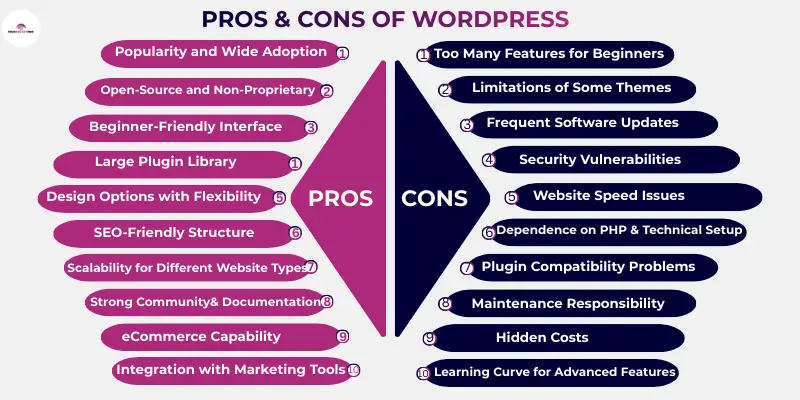
Quick Answer: Is WordPress Worth It?
- Biggest advantage: WordPress is free, flexible, and doesn’t lock you into one company, you can build almost any type of website and move hosts anytime.
- Biggest drawback: It needs ongoing maintenance, updates, backups, and security checks are your responsibility, not automatic.
- Best for: Bloggers, small businesses, and online stores that want full control and room to grow.
- Not ideal for: People who want a “set it and forget it” website with zero upkeep, a hosted platform like Wix or Squarespace may suit better.
- Verdict: For most website owners, WordPress’s flexibility outweighs its maintenance demands, especially once you know what to expect going in.
If you’re planning to build a website, you’ve probably heard about WordPress. But is it the right choice for you? When people search for the advantages and disadvantages of WordPress, they usually want to know if it’s the right platform for their website.
WordPress is a content management system (CMS) that helps you build and manage a website without coding. You can use it to create blogs, business websites, online stores, and more. It gives you control over design, content, and features through themes and plugins.
Before choosing any platform, it’s smart to understand both the good and the bad sides. Knowing the strengths helps you decide whether they fit your goals. Understanding the weaknesses helps you avoid common mistakes and unexpected costs.
In this article, I’ll explain everything in simple terms so you can confidently decide whether WordPress is the right choice for your website.
So, guys, without wasting time, let’s jump into the article to learn the pros and cons of WordPress, but before that lets see a short overview of WordPress.
What Is WordPress?
WordPress is software that helps you build and manage a website. It belongs to a category called a content management system (CMS). A CMS allows you to create pages, write blog posts, upload images, and update your website without writing code.
Instead of building a site from scratch, WordPress gives you a dashboard where you can manage everything in one place.
WordPress is also the most widely used website platform in the world. Recent data shows that about 43% of all websites on the internet run on WordPress. When looking only at websites that use a CMS, WordPress holds more than 60% of the market share, which is far higher than any competing platform. This makes it the most widely used website building system in the world.
If you want the complete picture of how WordPress works, see our full guide: What is WordPress? A Beginner’s Guide.
There are two main versions of WordPress that beginners need to know: WordPress.com and WordPress.org
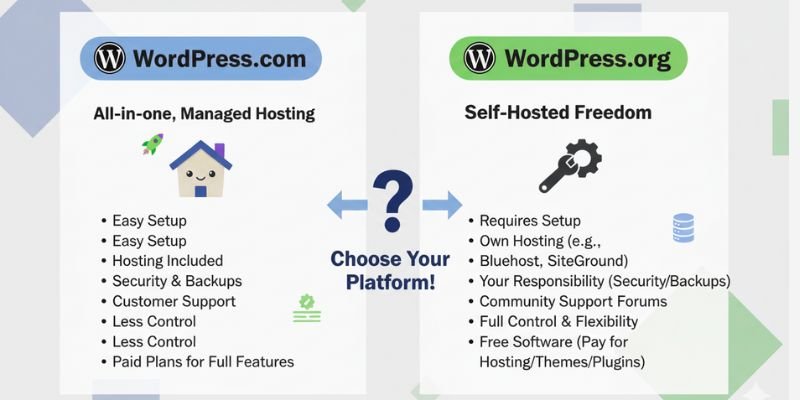
WordPress.org (Self-Hosted)
- You download and install the WordPress software for free.
- You buy your own hosting and domain name.
- You are in full control of how your website looks and works.
This version gives you the most flexibility and customization options, which is why most professionals and serious beginners choose it.
WordPress.com (Hosted Platform)
- Hosting is included for you, and there is even a free plan.
- Server management is not your responsibility.
- Lower-tier plans limit what you can install or change.
This version is easier to start with if you want a simple site and don’t want to worry about technical details. But it has limitations in design and control, especially on free or cheaper plans.
When people talk about WordPress’s power, flexibility, and full ownership, they are usually referring to WordPress.org, the self-hosted option.
Advantages of Using WordPress
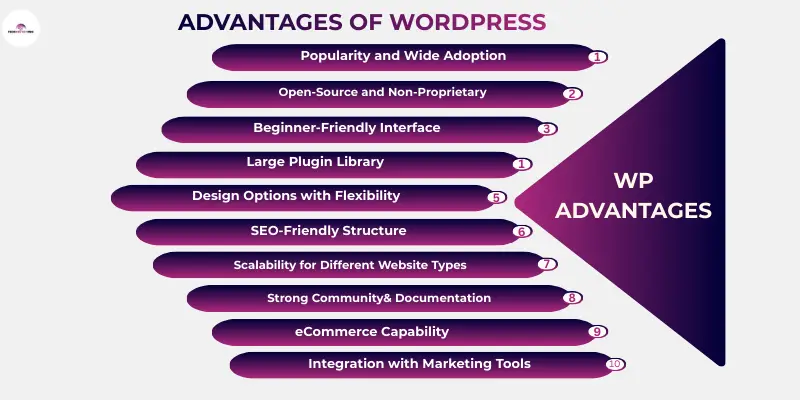
WordPress offers many benefits that make it a popular choice for beginners and businesses. It allows people to create websites without needing strong technical skills. The platform is flexible, so it can support many types of websites, from simple blogs to large online stores. Because of its large community and continuous improvements, WordPress remains reliable for long-term website growth.
So, let’s have a look at some essential benefits of WordPress.
- Popularity and Wide Adoption
- Open-Source and Non-Proprietary.
- Beginner-Friendly Interface.
- Large Plugin Library
- Design Options with Flexibility
- SEO-Friendly Structure
- Scalability for Different Website Types.
- Strong Community and Documentation
- eCommerce Capability
- Integration with Marketing Tools
Now, let us explore all the above-mentioned pros of WordPress in detail.
1. Popularity and Market Share
WordPress is the most widely used website platform on the internet. Millions of websites run on it, including blogs, business sites, and online stores. This popularity means the platform is well-tested and trusted. It also continues to improve through frequent updates and new features. Because many people use it, beginners can easily find help when they get stuck.
Key advantages
- A large number of websites are already using it
- Huge global community of users and developers
- There is a variety of tutorials and learning resources available
- Regular improvements and updates
- A professional support service is easily accessible
2. Open-Source and Non-Proprietary Platform
WordPress is open-source software. This means the code is available for anyone to view or improve. You are not locked into one company that controls your website. You own your website files and your content. If needed, you can move your site to another hosting provider at any time.
Key advantages
- You own your website completely
- No license fees for the software
- Freedom to change hosting providers
- Developers can customize the code
- Long-term flexibility for your site
3. Ease of Use
WordPress is designed to be easy for beginners. The dashboard shows all the tools needed to manage your website. You can create pages, write blog posts, and upload images without coding. The editor works like a simple document editor. After a short time, most beginners become comfortable using it.
Key advantages
- Simple dashboard for managing content
- Easy page and post creation
- A visual editor that looks similar to a word processor
- For basic tasks, no coding knowledge required
- Quick learning curve for new users
4. Large Plugin Library
Plugins are tools that add extra features to your website. WordPress offers thousands of plugins that you can install in just a few clicks. These plugins help you add forms, improve security, track visitors, or improve SEO. You can choose only the features you need. This makes your website more flexible.
Key advantages
- Thousands of plugins available
- Add features without coding
- Tools for SEO, security, and marketing
- Easy installation from the dashboard
- Expand your website as it grows.
5. Design Options with Flexible
WordPress uses themes to control how your website looks. There are many free and paid themes available. You can change the layout, colours, and style with only a few clicks. Many themes are also mobile-friendly. This helps your website look good on phones and tablets.
Key advantages
- A wide range of themes is available
- Easy customization of layout and style
- Mobile-friendly design options
- There are both free and premium themes to choose from
- Ability to change themes anytime
6. SEO-Friendly Structure
WordPress makes it easier for websites to appear in search results. It has built-in features that help search engines understand your content. You can organize pages, optimize titles, and improve images without complex tools. Many beginners choose WordPress because it supports SEO from the start. With the right setup, your website can become more visible in search engines like Google.
Key advantages
- Clean URL Structure – WordPress allows simple and readable URLs such as yourwebsite.com/blog-post. These URLs are easier for both users and search engines to understand.
- Easy Meta Title and Description Editing – With SEO plugins, you can easily control page titles and meta descriptions. These elements help your pages appear better in search results.
- Image Optimization Options – WordPress allows you to add alt text to images. This helps search engines understand what the image shows and can improve image search visibility.
- Blogging Capabilities for Content Marketing – WordPress was originally built for blogging. It makes it easy to publish articles regularly, which helps attract organic traffic.
- SEO Plugins That Simplify Optimization – Plugins like Yoast SEO or Rank Math guide beginners step-by-step to improve their pages for search engines.
7. Scalability for Different Website Types
WordPress can support many types of websites. You can start with a small blog and expand later. As your traffic grows, you can upgrade your hosting or add new features. Many high-traffic websites successfully run on WordPress. This makes it suitable for long-term growth.
Key advantages
- Works for small and large websites
- Supports website growth over time
- Handles increasing traffic with proper hosting
- Add new features whenever needed
- Suitable for blogs, businesses, and stores
8. Strong Community and Documentation
WordPress has one of the largest online communities. Developers and users share solutions, guides, and tutorials online. If you face a problem, there is often a step-by-step guide available. Many forums also discuss common WordPress issues. This support makes learning much easier for beginners.
Key advantages
- Large and active community
- Many tutorials and guides are available
- Helpful discussion forums
- Easy to find solutions to common problems
- Many professionals offering support
9. eCommerce Capability
WordPress can also be used to create online stores. Plugins like WooCommerce allow you to sell products directly from your website. You can showcase products, handle orders, and accept payments. It supports both physical and digital products. This makes WordPress useful for small businesses.
Key advantages
- Turn a website into an online store
- Sell physical or digital products
- Manage orders and inventory
- Accept multiple payment methods
- Expand your store with extra plugins
10. Integration with Marketing Tools
WordPress works well with many marketing tools. You can connect email marketing platforms, analytics tools, and social media accounts. These tools help you understand your website and visitors. They also help you promote your content and grow your audience. Most integrations are easy to set up with plugins.
Key advantages
- Connect with email marketing platforms
- Integrate with analytics tools
- Link social media accounts
- Track visitor behaviour and traffic
- Support marketing and promotion activities
Disadvantages of Using WordPress
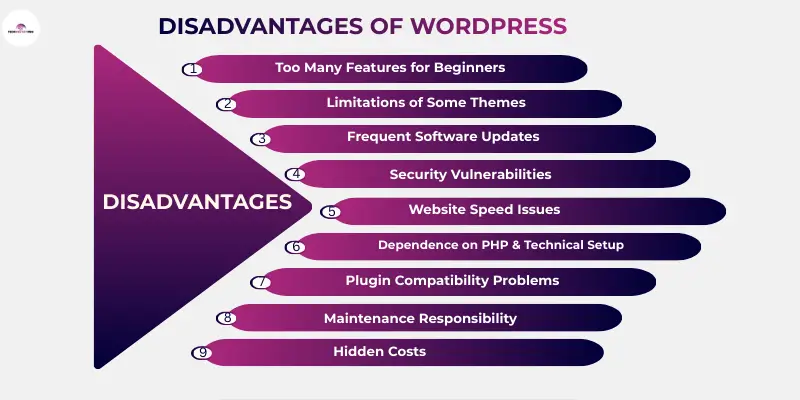
WordPress offers many benefits, but it also has some drawbacks that beginners should understand. Some features require extra plugins or technical setup. Managing updates and security can also take time if you run a self-hosted site. Knowing these limitations helps you decide whether WordPress is the right platform for your website.
Here is a list of all the drawbacks of WordPress.
- Too Many Features for Beginners
- Limitations of Some Themes
- Frequent Software Updates
- Security Vulnerabilities.
- Website Speed Issues
- Dependence on PHP and Technical Setup
- Plugin Compatibility Problems
- Maintenance Responsibility
- Hidden Costs
- Learning Curve for Advanced Features
1. An Over-Abundance of Features
WordPress offers many tools and settings. For someone building their first website, this can feel overwhelming. The WordPress dashboard includes options for themes, plugins, menus, and settings. Beginners may need time to understand where everything is. With practice, the platform becomes easier to use.
Main concerns
- Many settings can confuse beginners
- Learning the dashboard takes time
- Too many options can confuse beginners
- Thousands of themes and plugins make decisions harder
- Risk of installing unnecessary tools
2. Limitations of Some Themes and Templates
Themes and templates control the design and layout of your website. Many free options provide only basic customization. You may not be able to change layouts, colours, fonts, or other design elements easily. Some themes or templates also limit advanced features like custom headers, footers, or page layouts. To get full control, users often upgrade to premium themes or hire a developer.
Main concerns
- Limited design options in free themes or templates
- Advanced changes may require coding
- Premium themes or templates often cost money
- Advanced customization may need a developer
3. Frequent Software Updates
WordPress regularly releases updates for security and performance. Themes and plugins also receive updates. While updates improve the platform, they must be managed carefully. Sometimes a new update can cause compatibility problems with other plugins or themes. This means site owners must check updates before installing them.
Main concerns
- Updates are required regularly
- Compatibility issues may appear
- Website needs monitoring after updates
- Risk of the site breaking if ignored
4. Security Vulnerabilities
Because WordPress is very popular, it can attract hackers. Websites that use outdated plugins or weak passwords are at higher risk. Security problems often happen when site owners ignore updates. Proper security plugins and strong passwords can reduce these risks.
Main concerns
- Popular sites attract hackers
- Outdated plugins increase risk
- Weak passwords create security gaps
5. Website Speed Issues
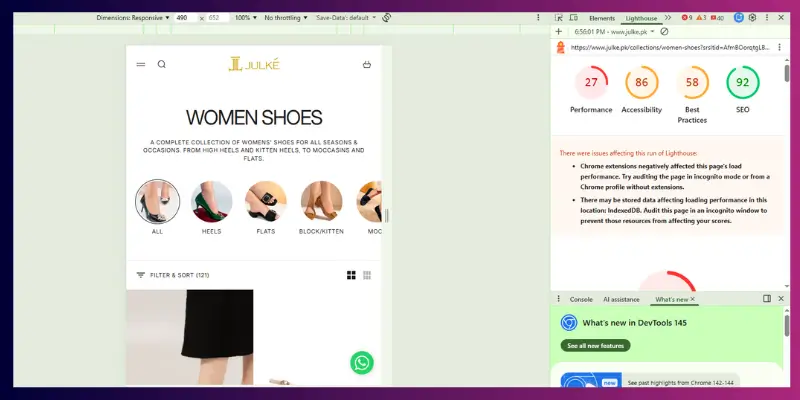
Website speed can become a problem if WordPress is not optimized. Heavy themes and too many plugins can slow down a site. Slow websites can frustrate visitors and affect search rankings. Good hosting and proper optimization help solve this issue.
Main concerns
- Poor hosting affects speed
- Heavy themes reduce performance
- Too many plugins affect the loading time
- Need for caching and optimization
6. Dependence on PHP and Technical Setup
WordPress runs on PHP and a database system. Most beginners do not need to deal with this directly. However, advanced customization sometimes requires technical knowledge. Fixing certain errors may also require help from a developer.
Main concerns
- Advanced tasks may require coding
- Poor coding in themes/plugins can cause errors
- Developers may be needed for fixes
7. Plugin Compatibility Problems
Plugins add useful features to WordPress websites. However, not all plugins work perfectly together. Sometimes, two plugins may not work well together and can cause compatibility issues. This can cause errors or break certain website functions. Testing plugins before using them widely is important.
Main concerns
- Plugins may conflict with each other
- Website features can stop working
- Troubleshooting takes time
8. Maintenance Responsibility
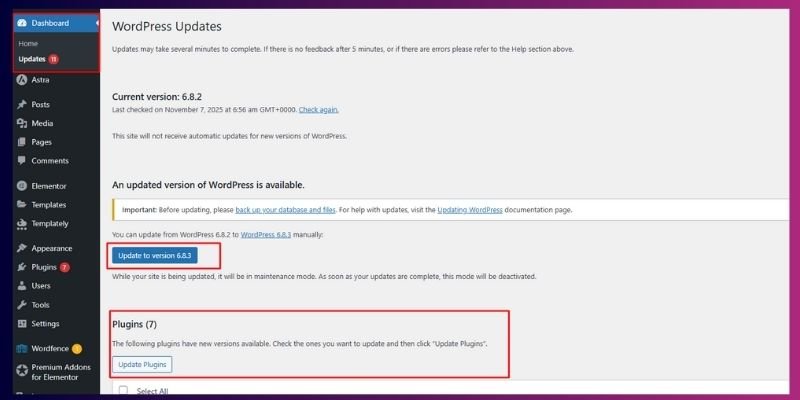
When using self-hosted WordPress, you manage your website yourself. This includes updates, backups, and security checks. Beginners may forget to perform these tasks regularly. If maintenance is ignored, problems can appear over time.
Main concerns
- Regular updates are required
- Backups must be managed
- Security monitoring is necessary
9. Hidden Costs
WordPress itself is free to download. However, running a website usually involves other costs. You need hosting, a domain name, and sometimes premium themes or plugins. These costs can increase as your website grows.
Main concerns
- Hosting and domain costs
- Premium themes and plugins
- Possible developer expenses
10. Learning Curve for Advanced Features
Basic tasks in WordPress are simple. Creating posts, pages, and menus is easy. But advanced features take more time to learn. Custom layouts, SEO setup, and performance optimization may require research or practice.
Main concerns
- Advanced customization takes time
- SEO and optimization require learning
- Beginners may need tutorials or guides
Surprising Facts about WordPress
- WordPress runs nearly 43% of all websites worldwide, which means almost half of the internet relies on it.
- Among sites built with a content management system, WordPress captures more than 60% of the market, leaving competitors far behind.
- There are around 600 million live websites powered by WordPress today.
- WordPress offers more than 60,000 plugins, letting users add features like forms, SEO tools, and online stores easily.
- You can choose from tens of thousands of themes, giving your site a fresh look with just a few clicks.
- Over one-third of all online stores use WooCommerce, WordPress’s popular eCommerce plugin, to sell products.
- About 90% of WordPress websites run the latest version, which helps keep them secure and stable.
- WordPress is available in more than 200 languages, so people everywhere can use it in their native language.
- Thousands of new WordPress websites appear every single day, showing its continued growth and popularity.
- Even among the top 10,000 websites globally, nearly a quarter run on WordPress, proving it works for high-traffic, professional sites too.
Who Should Use WordPress?
WordPress works for many types of users because of its flexibility. It’s not just for bloggers; it can handle business sites, online stores, and creative projects. Here’s who benefits the most:
Bloggers
WordPress started as a blogging platform, and it still excels here. You can write posts, schedule them, and organize content easily. Plugins help improve SEO, share content on social media, and grow your audience.
Small Businesses
Small businesses can build professional websites without hiring a developer. You can create pages for services, contact forms, and even integrate booking tools. Themes make your website look polished with minimal effort.
Online Store Owners
WordPress with WooCommerce can turn your site into a full online store. You can manage products, monitor orders, and receive payments. It’s suitable for both small shops and larger stores, scaling over time.
Agencies
Marketing or design agencies can use WordPress to manage multiple client websites efficiently. It supports custom layouts, plugins for SEO, analytics, and other business tools.
Content Creators
Podcasters, video creators, and writers can showcase their work using WordPress. You can embed audio, video, and images easily, and organize content in a user-friendly way.
Educators and Course Creators
Teachers, coaches, and course creators can use WordPress to share lessons and sell online courses. Plugins add quizzes, student logins, and payment options without any coding. You stay in control of your content and pricing instead of relying on a third-party course platform.
Nonprofits
Nonprofits can build a website to share their mission, accept donations, and post updates. Many of the themes and plugins you need are free, which helps when working with a tight budget. You can add donation forms, event calendars, and volunteer sign-up forms with just a few clicks.
Who Should Avoid WordPress?
While WordPress is flexible, it’s not perfect for everyone. Some users may find it too hands-on or time-consuming.
Users Who Don’t Want Maintenance
If you don’t want to manage updates, backups, or security, WordPress may feel overwhelming. Self-hosted sites require regular care to stay secure and fast.
People Who Want All-in-One Managed Platforms
Platforms like Wix, Squarespace, or Shopify handle hosting, updates, and security automatically. If you prefer everything done for you, WordPress may not be the best fit.
Absolute Beginners Who Want Zero Setup
WordPress requires domain registration, hosting setup, and theme selection. Users expecting a plug-and-play solution might get frustrated with the initial steps.
How to Reduce the Cons of WordPress?
Even if WordPress has drawbacks, many can be minimized with the right approach. Here are practical tips:
Choose Reliable Hosting
A reliable hosting helps your website load faster, stay secure, and remain available online. Managed WordPress hosting can reduce technical headaches.
Use Trusted Themes and Plugins
Only install well-reviewed themes and plugins from trusted sources. This reduces compatibility issues and security risks.
Keep Updates Automatic
Enable automatic updates for WordPress, plugins, and themes where possible. This keeps your site safe without constant manual work.
Install Security Tools
Use security plugins to block threats, scan for malware, and enforce strong passwords. A secure site keeps both your data and your visitors’ information safe.
Optimize Images and Speed
Compress images and use caching tools to make your website load faster. A faster site improves user experience and search engine rankings.
Helpful Tips
- Take It Step by Step – Don’t try to do everything at once. Focus on learning one feature at a time.
- Explore the Tools – Click around menus and settings to see what each option does. Hands-on practice helps you understand faster.
- Keep It Organized – Use clear categories, tags, and menus to make your site easy to navigate.
- Pick Reliable Plugins – Only add plugins you really need, and choose ones with good reviews. Too many can slow down your site.
- Update Regularly – Keep your software, themes, and plugins up to date for security and smooth performance.
- Use Learning Resources – Watch tutorials, read guides, and join forums. The WordPress community has lots of helpful advice.
Conclusion
So, friends, in this article, we looked at the advantages and disadvantages of using WordPress. You learned what WordPress is, how it works, and why millions of websites rely on it. We also explored its strong points, such as flexibility, customization, and SEO features. At the same time, we discussed challenges like maintenance, security risks, and the learning curve for beginners.
Understanding both the good and the bad sides helps you make a smarter decision. Every website platform has strengths and limitations, and WordPress is no different. The key is knowing whether its flexibility and control match your needs.
When used correctly, the benefits can easily outweigh the drawbacks. But the right choice always depends on your goals, skills, and the type of website you want to build.
Now it’s your turn to decide. Think carefully about what you need, compare your options, and choose the platform that fits your plan best.
FAQs About the Advantages and Disadvantages of Using WordPress
WordPress gives users a lot of control over their websites. You can change the design, add new features, and manage content easily. It also has thousands of themes and plugins that help extend functionality. Another benefit is that it supports SEO practices, which can help your site appear in search results. Many beginners choose it because they can build a site without writing code.
WordPress websites require regular maintenance. You need to update the core software, themes, and plugins to keep everything secure. If too many plugins are installed, the website may slow down. Some beginners also feel confused at the start because there are many settings and options. With the right setup and guidance, most of these issues can be managed.
Yes, many beginners start with WordPress because it offers simple tools to publish content. The dashboard makes it easy to create pages, write blog posts, and upload images. There are also many tutorials and guides available online. At the same time, beginners may need some time to learn how plugins, themes, and hosting work together. Once they understand the basics, managing the site becomes much easier.
WordPress is often chosen because it offers more flexibility than many website builders. Users can customize almost every part of their website. Platforms like Wix or Squarespace may be easier at the beginning, but offer fewer advanced options. WordPress allows you to scale your site as it grows. The better choice depends on how much control and customization you want.
Many websites use WordPress because it is flexible and widely supported. Developers, designers, and businesses trust it for different types of websites. It works well for blogs, company sites, and even online stores. The large community also means there are many tools, tutorials, and support resources available. This combination of flexibility and support keeps WordPress popular worldwide.
Yes. WordPress still powers over 40% of all websites, so the skills stay useful for years. It has a short learning curve for basics and a longer one for advanced customization, but most beginners are comfortable within a few weeks.
Some people move away from WordPress because they want zero maintenance, prefer AI website builders that create a site in minutes, or find WordPress too flexible for a very simple project. Most blogs, businesses, and online stores still choose WordPress for its control and long-term flexibility.
Yes, the WordPress software itself is free to download and use. You can get it from WordPress.org and install it on your hosting server. However, running a website still has some costs. You usually need to pay for hosting, a domain name, and sometimes premium themes or plugins. So the platform is free, but building a full website may require a small budget.
WordPress can be very secure when it is managed properly. The core software is regularly updated by developers to fix security issues. Problems usually happen when users ignore updates or install unsafe plugins. Using strong passwords and security plugins can greatly reduce risks. Regular updates and backups help keep your website safe.



- Be Respectful
- Stay Relevant
- Stay Positive
- True Feedback
- Encourage Discussion
- Avoid Spamming
- No Fake News
- Don't Copy-Paste
- No Personal Attacks
- Be Respectful
- Stay Relevant
- Stay Positive
- True Feedback
- Encourage Discussion
- Avoid Spamming
- No Fake News
- Don't Copy-Paste
- No Personal Attacks
