WordPress vs WooCommerce: What’s the Real Difference (Beginner-Friendly Guide)
Published: 15 Apr 2026
If you’re planning to build a website or start selling online, you’ve probably come across WordPress and WooCommerce. Many beginners get confused and think they are two separate platforms competing with each other.
In reality, WordPress is a website builder that helps you create and manage your site, while WooCommerce is a plugin that adds online store features to that same website. People often compare them because they want to know which one to use for their specific needs, especially when starting a blog, business site, or e-commerce store.
In this guide, you’ll learn what each one does, how they are different, how they work together, and which option makes more sense for you based on your goals.
Let’s see which one suits you better.
What is WordPress?
WordPress is a content management system (CMS) that lets you create, manage, and update a website without needing coding skills. It started as a blogging tool, but today it powers everything from simple blogs to large business websites and online stores.
According to recent industry data, WordPress powers over 40% of all websites on the internet, which makes it the most widely used website platform in the world. This popularity means you get strong community support, regular updates, and thousands of tools to extend your site.
What Can You Build with WordPress?
With WordPress, you’re not limited to one type of site. You can build:
- Blogs and personal websites
- Business websites for services or companies
- Portfolio sites for freelancers and creatives
- Landing pages for marketing campaigns
- Membership sites and online communities
Many well-known brands and small businesses rely on WordPress because it grows with their needs.
Key Features of WordPress
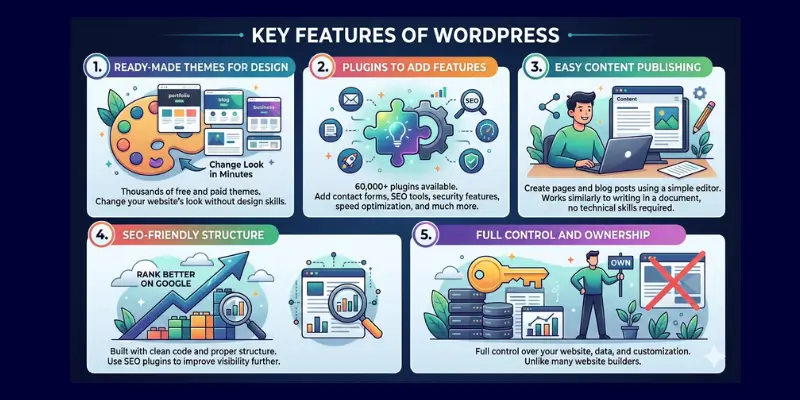
1. Ready-Made Themes for Design
WordPress offers thousands of free and paid themes. You can change your website’s look in minutes without design skills.
2. Plugins to Add Features
There are 60,000+ plugins available. You can add contact forms, SEO tools, security features, speed optimization, and much more.
3. Easy Content Publishing
You can create pages and blog posts using a simple editor. It works similarly to writing in a document, no technical skills required.
4. SEO-Friendly Structure
WordPress is built with clean code and proper structure, which helps your site rank better on Google. You can also use seo plugins to improve visibility further.
5. Full Control and Ownership
Unlike many website builders, WordPress gives you full control over your website, data, and customization.
Why Beginners Choose WordPress
- No coding required
- Flexible for any type of website
- Budget-friendly to start
- Scalable as your website grows
In simple words: WordPress builds the foundation of your website, you design it, manage content, and control everything from one place.
What is WooCommerce?
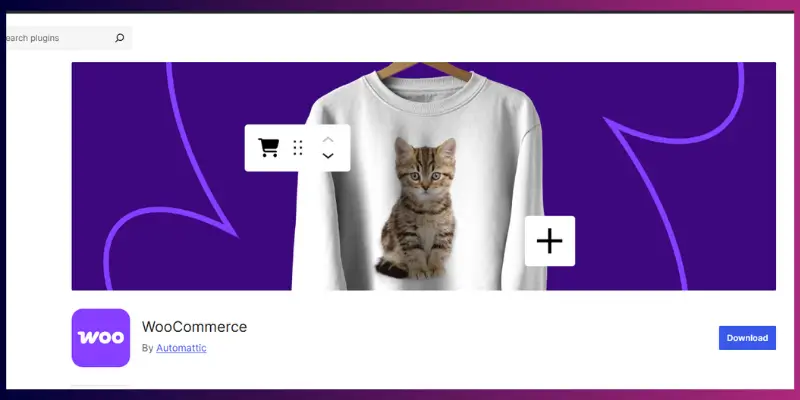
WooCommerce is a free eCommerce plugin built for WordPress that allows you to create and manage an online store directly on your website.
Instead of using a separate platform, WooCommerce works inside WordPress and adds all the features you need to sell products, accept payments, and handle orders.
Today, WooCommerce powers millions of online stores worldwide and is one of the most popular eCommerce solutions because it gives full control to store owners without monthly platform restrictions.
What Can You Do with WooCommerce?
With WooCommerce, you can run a complete online business:
- Sell physical products (clothing, electronics, etc.)
- Sell digital products (ebooks, courses, software)
- Accept payments through multiple gateways (cards, bank transfer, etc.)
- Manage orders, customers, and refunds
- Offer discounts, coupons, and promotions
Whether you’re starting small or planning a large store, WooCommerce supports both.
Key Features of WooCommerce
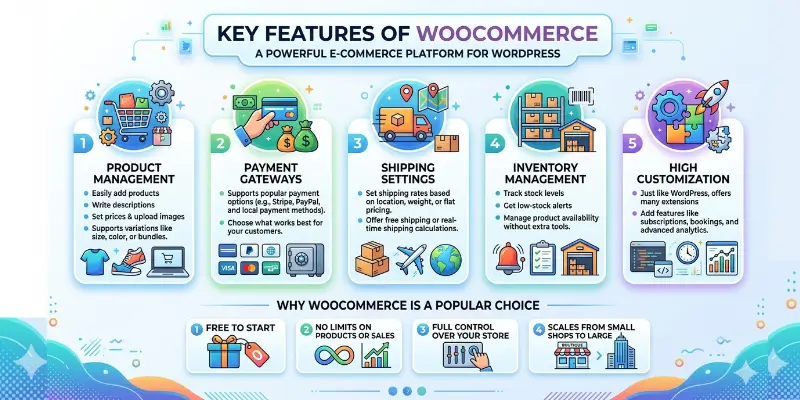
1. Product Management
You can easily add products, write descriptions, set prices, and upload images. It also supports product variations like size, colour, or bundles.
2. Payment Gateways
WooCommerce supports popular payment options like Stripe, PayPal, and local payment methods. You can choose what works best for your customers.
3. Shipping Settings
Set shipping rates based on location, weight, or flat pricing. You can also offer free shipping or real-time shipping calculations.
4. Inventory Management
WooCommerce includes built-in tools for inventory management, including stock tracking and WooCommerce backorders, without requiring additional plugins. Track stock levels, get low-stock alerts, and manage product availability without extra tools.
5. High Customization
Just like WordPress, WooCommerce offers many extensions to add features like subscriptions, bookings, and advanced analytics.
Why WooCommerce is a Popular Choice
- Free to start
- No limits on products or sales
- Full control over your store
- Scales from small shops to large businesses
WooCommerce takes your WordPress website and turns it into a fully functional online store where you can sell anything.
How WordPress and WooCommerce Work Together
This is the part that clears most confusion for beginners.
- WordPress = Website builder (the foundation)
- WooCommerce = eCommerce system (the selling feature)
WooCommerce is not a separate platform. It runs inside WordPress, which means you must install WordPress first before using WooCommerce.
How the Integration Actually Works
When you install WooCommerce on your WordPress site, it automatically adds key store features like:
- Product pages
- Shopping cart
- Checkout system
- Payment options
- Order management dashboard
You still manage everything from your WordPress dashboard, but now with extra eCommerce tools.
This setup is often called a WordPress eCommerce website.
Why This Setup is Powerful
- You control both content and the store in one place
- You can combine blogging + selling (great for SEO)
- You can customize everything using themes and plugins
- You are not locked into a closed platform
This flexibility is why many businesses prefer WooCommerce over hosted solutions.
Real-Life Example
Think of it like this:
- WordPress = your shop building (walls, design, layout)
- WooCommerce = your store system (products, cashier, payments)
Without the building, the store system cannot exist.
Important Clarification (Most Asked Question)
- Can WordPress work without WooCommerce? → Yes
- Can WooCommerce work without WordPress? → No
WooCommerce is a WordPress plugin that adds selling features to your website. It doesn’t replace WordPress; it works with it.
WordPress vs WooCommerce: Quick Comparison
| Feature | WordPress | WooCommerce |
| Type | Content Management System (CMS) | eCommerce plugin for WordPress |
| Primary Purpose | Build and manage websites | Add online store functionality |
| Status | Works as a standalone platform | Requires WordPress to function |
| Core Functionality | Content creation, pages, blogs, media management | Product listings, cart, checkout, order management |
| Best Use Cases | Blogs, business websites, portfolios, and landing pages | Online stores, digital product sales, subscriptions |
| Works Alone? | Yes | No |
| Ease of Use | Beginner-friendly and simple to manage | Slightly complex due to the store setup |
| Customization | Thousands of themes and plugins | Store-specific customization with extensions |
| SEO Capabilities | Strong SEO foundation for content | Product-level SEO for eCommerce |
| Scalability | Suitable for small to large websites | Scales from small shops to large stores |
| Learning Curve | Easy to learn | Moderate (requires understanding of payments, shipping, etc.) |
| Control & Ownership | Full control over the website | Full control over the store and data |
| Cost Structure | Hosting, domain, optional plugins/themes | Free core + paid extensions + transaction fees |
What This Table Helps You Understand
- WordPress is for building and managing your website
- WooCommerce is for selling products on that website
You don’t choose one over the other in most cases; you use them together based on your needs.
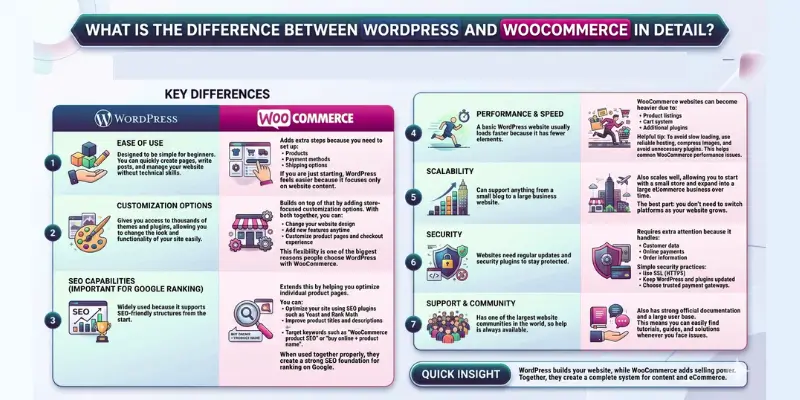
What is the difference between WordPress and WooCommerce in detail?
Before choosing between wordpress and WooCommerce, it helps to understand how they actually differ in real use. WordPress is mainly used to build and manage websites, while WooCommerce adds selling features on top of it. Both work together, but they serve different purposes. In this section, I’ll break down their key differences in a simple way so you can clearly see how each one works and which option fits your needs better.
1. Ease of Use
WordPress is designed to be simple for beginners. You can quickly create pages, write posts, and manage your website without technical skills.
WooCommerce adds extra steps because you need to set up:
- Products
- Payment methods
- Shipping options
If you are just starting, WordPress feels easier because it focuses only on website content.
2. Customization Options
WordPress gives you access to thousands of themes and plugins, allowing you to change the look and functionality of your site easily.
WooCommerce builds on top of that by adding store-focused customization options.
With both together, you can:
- Change your website design
- Add new features anytime
- Customize product pages and checkout experience
This flexibility is one of the biggest reasons people choose WordPress with WooCommerce.
3. SEO Capabilities (Important for Google Ranking)
WordPress is widely used because it supports SEO-friendly structures from the start.
WooCommerce extends this by helping you optimize individual product pages.
You can:
- Optimize your site using SEO plugins such as Yoast and Rank Math
- Improve product titles and descriptions
- Target keywords such as “WooCommerce product SEO” or “buy online + product name”
If you want to get more traffic, focus on improving SEO for your WooCommerce products to rank higher on Google.
4. Performance & Speed
A basic WordPress website usually loads faster because it has fewer elements.
WooCommerce websites can become heavier due to:
- Product listings
- Cart system
- Additional plugins
Helpful tip:
To avoid slow loading, use reliable hosting, compress images, and avoid unnecessary plugins. This helps reduce common WooCommerce performance issues.
5. Scalability
WordPress can support anything from a small blog to a large business website.
WooCommerce also scales well, allowing you to start with a small store and expand into a large eCommerce business over time.
The best part: you don’t need to switch platforms as your website grows.
6. Security
WordPress websites need regular updates and security plugins to stay protected.
WooCommerce requires extra attention because it handles:
- Customer data
- Online payments
- Order information
Simple security practices:
- Use SSL (HTTPS)
- Keep WordPress and plugins updated
- Choose trusted payment gateways
7. Support & Community
WordPress has one of the largest website communities in the world, so help is always available.
WooCommerce also has strong official documentation and a large user base.
This means you can easily find tutorials, guides, and solutions whenever you face issues.
Quick Insight
WordPress builds your website, while WooCommerce adds selling power. Together, they create a complete system for content and e-commerce.
How Much Does WordPress and WooCommerce Cost?
Understanding the cost difference helps you plan your website or online store better before you start. Both WordPress and WooCommerce are flexible when it comes to budget, but the total cost depends on the features you choose and how your website grows over time.
How much does WordPress cost?
WordPress itself is free to use, but you will need a few basic things to run your website:
- Hosting (monthly or yearly)
- Domain name (your website address)
- Optional premium themes for design
- Optional plugins for extra features
The total cost can stay low at the start, especially for simple websites, and increases only when you add advanced tools.
How much does WooCommerce cost?
WooCommerce is also free to install on WordPress, but running an online store may include additional expenses:
- Free core WooCommerce plugin
- Paid extensions for extra features (like bookings or subscriptions)
- Payment gateway charges (based on transactions)
- Optional advanced store tools or integrations
You only pay more when you need advanced functionality, not for the basic store setup.
Can you start on a low budget?
Yes, both WordPress and WooCommerce allow you to start small without a heavy investment. Many beginners begin with basic hosting and free tools, then upgrade as their website or store starts growing.
In simple terms, you don’t need a big budget to start; you only spend more when your needs increase.
What are the Pros and Cons of WordPress and WooCommerce?
To make the right choice, it’s important to look at both strengths and limitations. WordPress and WooCommerce work well together, but each has its own advantages depending on what you want to build.
WordPress Pros
- Easy to use, even for beginners
- Flexible for different types of websites
- Great for blogs, business sites, and content creation
WordPress Cons
- Advanced features usually need plugins
- Some customization may require extra setup or tools
WooCommerce Pros
- Full control over your online store
- No restrictions like hosted platforms
- Highly customizable for different types of products and services
WooCommerce Cons
- Setup takes more time compared to basic websites
- Needs proper optimization to maintain fast performance
When Should You Use WordPress Only?
WordPress alone is a great choice when your main goal is to build a website without selling anything online. It works well for simple and content-focused websites where you want full control over design and publishing.
Choose WordPress if:
- You are not planning to sell products or services online
- You want to create a blog, news site, or informational website
- Your main focus is sharing content, updates, or company information
- You need a simple, easy-to-manage website without store features
WordPress is best when you want to build and manage a website, not run an online shop.
When is WooCommerce the right solution for your WordPress site?
WooCommerce is the right option when your website is not just for information, but for selling products or services online. It adds all the features needed to turn a normal WordPress website into a complete online store.
Choose WooCommerce if:
- You want to sell physical or digital products online
- You need a shopping cart, checkout system, and payment options
- You want full control over your store, products, and customer data
- You plan to grow a small website into a complete eCommerce business
WooCommerce is the right choice when your goal is to run an online store using WordPress.
The WordPress and WooCommerce ecosystem
The WordPress and WooCommerce ecosystem refers to how both tools work together, along with themes, plugins, and services, to build a complete website or online store. Instead of being separate systems, they form a connected setup where each part plays a specific role.
WordPress acts as the foundation where you create and manage your website content, while WooCommerce adds the eCommerce layer that enables selling products, handling payments, and managing orders. Around them, there are thousands of themes and plugins that extend functionality, such as SEO tools, security plugins, marketing tools, and design builders.
This ecosystem is one of the main reasons many beginners and businesses choose WordPress. It allows you to start small with a basic website and gradually add more features as your needs grow, without switching platforms.
Common Beginner Mistakes
When starting with WordPress and WooCommerce, many beginners face issues not because of the tools, but because of small planning mistakes. Avoiding these early can save time, money, and performance problems later.
Mistakes to Avoid:
- Thinking WordPress and WooCommerce are competing platforms instead of understanding they work together
- Installing WooCommerce without a clear plan for products, payments, and shipping setup
- Ignoring hosting quality, which can lead to slow website performance
- Not focusing on SEO from the beginning results in poor visibility on search engines
These mistakes often cause slow loading speed, confusion in setup, and lower rankings on Google, especially for new websites.
Final Thoughts
So, guys, WordPress and WooCommerce serve different purposes. WordPress builds and manages your website. WooCommerce adds selling features when you want to run an online store. They both work together, but they play different roles.
WordPress works well if you want a simple website, blog, or business page. WooCommerce works better when you want to sell products, take payments, and manage orders. You can also start with WordPress and add WooCommerce later when you need eCommerce features.
Understanding the WordPress vs WooCommerce difference helps you pick the right setup for your goals.
Now that you know the key differences, choose the one that fits your goals best.
FAQs (WordPress vs WooCommerce)
WordPress is a platform used to build and manage websites, such as blogs and business sites. WooCommerce is a plugin that adds eCommerce features to WordPress so you can sell products online.
It depends on your goal. WordPress is better for building websites and publishing content, while WooCommerce is better for selling products online. Most online stores use both together for the best results.
No, WooCommerce cannot work without WordPress. It is a plugin designed specifically for WordPress websites, so you must install WordPress first to use it.
WooCommerce is not built into WordPress by default, but it works as an official plugin. You install it on WordPress to add online store functionality.
Yes, you can use WordPress without WooCommerce. Many people use it for blogs, portfolios, and business websites where selling products is not needed.
Yes, if you want to sell products on a WordPress site, WooCommerce is one of the most popular options. It provides cart, checkout, and payment features.
WordPress is easier for beginners because it focuses on basic website setup and content management. WooCommerce adds extra steps like product setup, shipping, and payment configuration.
Yes, it is free to install and use WooCommerce. However, you may still pay for hosting, premium extensions, themes, or payment gateway charges depending on your store’s needs.
WooCommerce can slow down a website if the hosting is poor or if too many plugins are used. With good hosting and proper optimization, you can keep your site fast and smooth.
If you are a beginner, start with WordPress to build your website first. Later, you can add WooCommerce when you are ready to sell products online.


- Be Respectful
- Stay Relevant
- Stay Positive
- True Feedback
- Encourage Discussion
- Avoid Spamming
- No Fake News
- Don't Copy-Paste
- No Personal Attacks
- Be Respectful
- Stay Relevant
- Stay Positive
- True Feedback
- Encourage Discussion
- Avoid Spamming
- No Fake News
- Don't Copy-Paste
- No Personal Attacks
