Pros and Cons of WooCommerce (2026 Guide): Is It the Right Choice for You?
Published: 22 Apr 2026
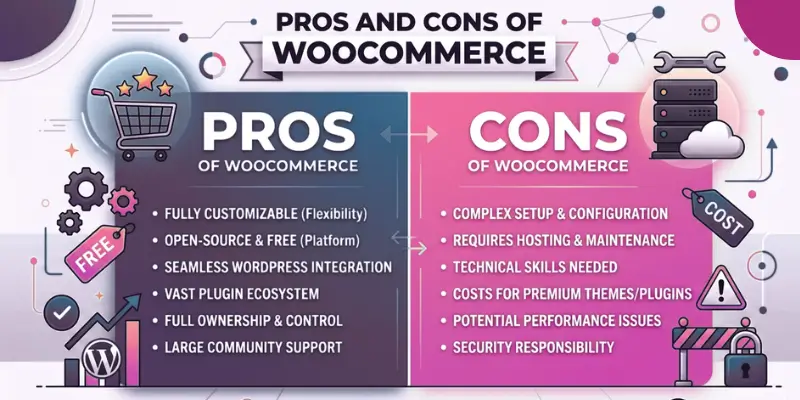
Thinking about starting an online store, but not sure if WooCommerce is the right option?
You’re not alone.
Many people compare WooCommerce with platforms like Shopify, but still feel confused. Some say it’s powerful. Others say it’s complicated.
So what’s the truth?
In this guide, you’ll learn:
- What WooCommerce really is
- WooCommerce advantages and disadvantages
- Real costs and hidden factors
- Who should use it (and who should not)
By the end, you’ll have a clear answer for your own situation.
What is WooCommerce?
WooCommerce is a free plugin that turns a WordPress website into a full online store.
You can:
- Add products
- Accept payments
- Manage orders
- Track customers
Right now, WooCommerce is one of the most popular eCommerce platforms in the world.
- It powers 4+ million online stores
- It holds around 20%–39% market share in e-commerce
- It runs on WordPress, which powers over 40% of all websites
That means millions of businesses, from small shops to large brands, are using it.
How WooCommerce Works (Beginner Flow)
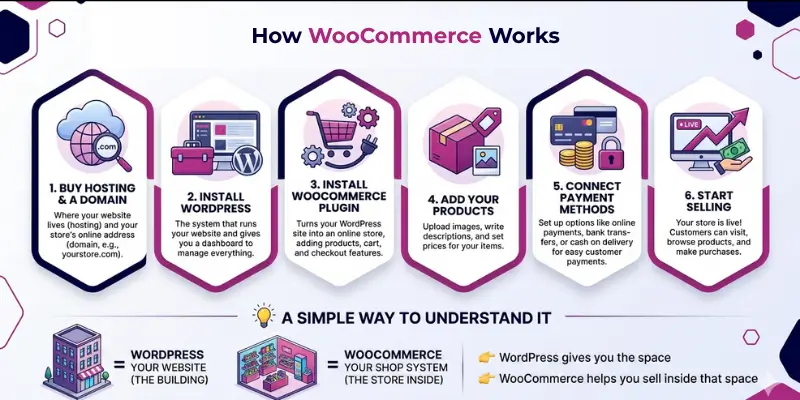
Setting up WooCommerce may look technical at first, but the process is actually simple when you break it down. Most people follow the same basic steps to get their store live. Once everything is connected, your website becomes a working online shop.
✔ Step-by-Step Setup
1. Buy hosting and a domain
This is where your website lives. The domain is your store name (like yourstore.com), and hosting keeps your site online.
2. Install WordPress
WordPress is the system that runs your website. It gives you a dashboard where you manage everything.
3. Install the WooCommerce plugin
This is what turns your normal website into an online store. It adds features like products, cart, and checkout.
4. Add your products
You can upload product images, write descriptions, and set prices. This is what your customers will see and buy.
5. Connect payment methods
You can add options like bank transfer, cash on delivery, or online payments so customers can pay easily.
6. Start selling
Once everything is ready, your store is live. Customers can visit your site, place orders, and make payments.
Simple Way to Understand It
Think of it like this:
- WordPress = your website (the building)
- WooCommerce = your shop system (the store inside it)
WordPress gives you the space
WooCommerce helps you sell inside that space
Cost of Using WooCommerce (Real Truth)
Many people think WooCommerce is 100% free.
That’s only partly true.
What’s free:
- WooCommerce plugin
- Basic features
What you actually pay for:
- Hosting (server to run your site)
- Domain name
- Premium themes (optional)
- Plugins (for extra features)
Example: You can start with $100–$300 per year, but bigger stores can spend much more.
The good part?
You control your budget completely
No forced monthly fees like other platforms
Key Features of WooCommerce (What You Actually Get)
Before looking at the pros and cons, it’s important to understand what WooCommerce can really do for your store.
These are not just features on paper; these are the tools you’ll use daily to run and grow your business.
✔ Flexible Payment Options (Sell to Anyone, Anywhere)
WooCommerce supports multiple payment methods, so you’re not limited to one option.
You can accept:
- Bank transfers
- Cash on delivery (very common in Pakistan)
- Credit/debit cards
- Online gateways like Stripe and PayPal
Why this matters: If customers don’t see their preferred payment option, they often leave. More options can directly increase your sales.
✔ Plugins & Integrations (Grow Without Coding)
WooCommerce has a large ecosystem of plugins that let you add features easily.
You can extend your store for:
- SEO (to rank your products on Google)
- Shipping (local and international delivery setup)
- Marketing (email campaigns, discounts, automation)
- Security (protect your website)
Real insight: Successful stores don’t use dozens of plugins; they use the right ones.
✔ Supports Multiple Business Models
WooCommerce is flexible enough to support different types of businesses.
You can sell:
- Physical products (clothes, electronics)
- Digital products (ebooks, courses)
- Subscription services
- Services (freelancers, consultants)
This makes it suitable for beginners as well as growing businesses.
✔ Dropshipping Support (Low Investment Selling)
WooCommerce also supports dropshipping.
This means:
- You don’t need to keep stock
- You sell products, and suppliers handle delivery
You can connect your store with tools that automate:
- Product imports
- Order processing
- Shipping
Why this matters: Dropshipping is popular for beginners because it requires low upfront investment.
✔ Content + Store Together (Content Marketing Power)
This is one of WooCommerce’s biggest strengths.
You can:
- Write blog posts
- Target keywords
- Bring traffic from Google
- Turn readers into customers
Example: You can write a guide like “best shoes for winter” and link your products inside it.
Why this matters: Instead of only relying on ads, you can get free traffic from search engines.
✔ Built-in Analytics & Reports (Track Your Growth)
WooCommerce gives you basic reports to understand your store’s performance.
You can track:
- Sales and revenue
- Orders
- Customer activity
Practical tip: Check your reports regularly to see which products are performing well and which need improvement.
What You Should Understand
WooCommerce gives you flexibility and control, but results depend on how you use it.a
Use the right features → your store grows
Ignore optimization → your store struggles
That’s why learning these features early can save you time and money later.
Advantages of WooCommerce
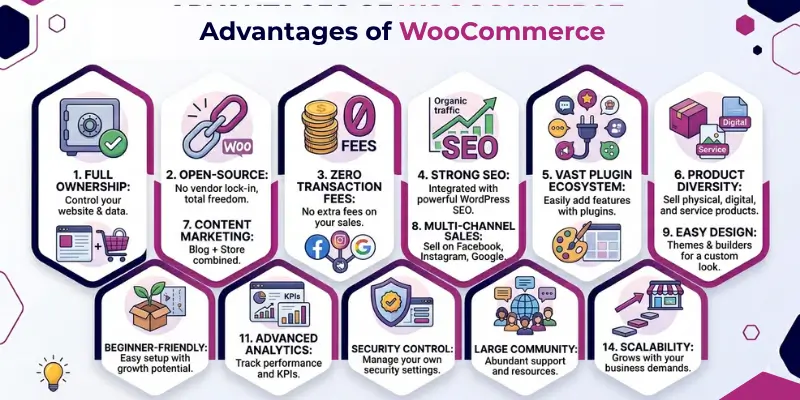
WooCommerce is a popular choice because it gives you full control over your online store. It allows you to manage costs, customize features, and grow at your own pace. It also works for different types of businesses, from small startups to large stores.
Let’s have a look at some essential benefits of WooCommerce. Here’s a quick summary of what WooCommerce offers before we go into details.
| Advantage | Real Data / Fact (2026) | Why It Matters for You |
| Open-Source & Full Control | Fully open-source with 344+ million downloads | You own your store, data, and can customize anything freely |
| Massive Global Usage | 4.17 to 4.47 million live stores worldwide | Trusted by millions of businesses globally |
| Wide Adoption | Used on 6+ million websites globally | Strong presence across different industries |
| High Market Share | 20%–39% of all eCommerce sites (~33.4% average) | One of the most widely used platforms |
| No Transaction Fees | No platform commission on sales | You keep more profit as your store grows |
| Scalable for Growth | $30–35 billion annual sales (GMV) | Can handle both small and large businesses |
| Strong Small Business Support | 60%+ users are small businesses | Ideal for startups and growing stores |
| Global Reach | Available in 150+ countries | Suitable for local and international selling |
| Supports integrations with Facebook, Instagram, and Google Shopping | Supports integrations with Facebook, Instagram, Google Shopping | Sell beyond your website and reach more customers |
| Design Flexibility | Thousands of themes and page builders available | Create a store that matches your brand easily |
| SEO + Content Power | Built on WordPress (content + store together) | Helps you get free traffic from Google |
| Analytics & Insights | Built-in reports + Google Analytics integration | Track sales, customers, and performance easily |
| Security Control | Full control over security setup | You decide how to protect and manage your store |
| Flexible Features via Plugins | Thousands of plugins available | Add almost any feature without custom coding |
| Beginner-Friendly (Basic Setup) | Simple setup for basic stores | Easy to start, even if you’re new |
Now let’s cover all the above-mentioned pros of WooCommerce in detail.
1. Full Control & Open-Source Freedom
WooCommerce is an open-source platform. This means you own your website, data, and store completely. No third party controls your business. You can move, edit, or expand your store anytime.
- Full ownership of the website and data
- No platform restrictions
- Easy to customize or migrate
Why this matters:
Some platforms restrict your features or can suspend your account. WooCommerce gives you full independence.
Example: If you want a custom checkout or special feature, you can add it with a developer.
2. Cost-Effective (No Platform Fees on Sales)
WooCommerce does not charge a fee on every sale. You only pay for hosting, domain, and optional tools. This gives you complete control over your budget.
- No commission on sales
- Lower long-term cost
- Better profit margins
- Ideal for growing stores
Why this matters:
Other platforms take a percentage from each sale. This reduces your profit over time.
Real impact: As your sales grow, you keep more of your earnings instead of losing them to platform fees.
3. SEO-Friendly (Free Organic Traffic)
WooCommerce is built on WordPress, which is strong for SEO. You can optimize every product page and blog post. This helps your store appear on Google.
- Easy Google ranking
- Get organic traffic
- Product page optimization
- Strong content marketing support
Why this matters:
You can get visitors without paying for ads.
Example: A blog post about your product can bring customers directly from search results.
4. Flexible Plugins & Custom Features
WooCommerce allows you to extend your store using plugins. You can add almost any feature without rebuilding your website. Developers can also create custom functions. One of WooCommerce’s biggest advantages is flexibility; you can customize nearly every part of the product page directly in code, without touching a single plugin.
- Easy feature expansion
- Custom functionality support
- No need for complex coding
- Add features anytime
- Large plugin library
Why this matters:
Your store can grow step by step based on your needs.
Practical advice: Only install useful plugins to keep your site fast and stable.
5. Works for Different Types of Businesses
WooCommerce is flexible for many business models. You are not limited to one type of store. It adapts as your business grows.
- Supports multiple business models
- Easy to scale or change niche
- Suitable for beginners and advanced users
Why this matters:
You can change your business model without changing platforms.
Example: You can start with physical products, then add digital downloads later.
6. Content + Selling in One Place
WooCommerce lets you combine blogging and selling on one website. You can create content and promote products together. This improves visibility and trust.
- Blog and store on the same platform
- Better SEO performance
- Higher customer trust
Why this matters:
Content helps bring traffic from search engines without paid ads.
Example: A helpful guide can lead readers to your product pages.
7. Sell on Multiple Platforms
You are not limited to your website with WooCommerce. You can connect your store with social media and marketplaces. This helps you reach more customers.
- Multi-channel selling
- Wider audience reach
- More traffic sources
- Increase sales opportunities
Why this matters:
More platforms mean more visibility and sales opportunities.
Example: You can sell through Instagram, Facebook, and Google Shopping.
8. Easy Design and Customization
WooCommerce gives you access to many themes and design tools. You can create a professional online store without coding knowledge. Page builders make customization easier.
- Quick store setup
- Ready-made themes available
- Simple layout customization
- Professional design
- No coding required for basic design
Why this matters:
Even beginners can create a clean and modern online store.
9. Beginner-Friendly (With a Learning Curve)
WooCommerce is easy to install and start using. WordPress users find it especially simple. However, advanced features take time to learn.
- Easy basic setup
- Step-by-step learning available
- Good for beginners starting out
Why this matters:
You can start quickly, but improving your store requires practice.
10. Useful Analytics and Insights
WooCommerce gives basic reports about your store’s performance. You can track sales, orders, and customer activity. You can also connect advanced tools for deeper analysis.
- Track sales and performance
- Understand customer behavior
- Connect with Google Analytics
- Make better decisions
Why this matters:
Data helps you understand what is working and what needs improvement.
11. Control Over Security
You have full control over your store’s security setup. You can use plugins, secure hosting, and manual updates. This gives you flexibility in how you protect your site.
- Custom security setup
- Security plugin support
- Full control over the protection level
Why this matters:
Security depends on your setup and maintenance.
Important note: Regular updates are needed to keep your store safe.
12. Large Community and Support
WooCommerce has a large global user base. Many developers, forums, and tutorials are available online. You can find solutions easily.
- Active global community
- Free learning resources
- Easy problem-solving support
Why this matters:
Help is always available when you face issues.
13. Can Grow With Your Business
WooCommerce can support small and large stores. You can start small and expand later without changing platforms with WooCommerce. Proper setup allows it to handle growth.
- Suitable for small to large stores
- Handles increasing traffic
- Long-term scalable solution
Why this matters:
You don’t need to migrate when your business expands.
One advantage for stores with popular products is the ability to accept orders even when items are temporarily out of stock, helping reduce missed sales opportunities.
Disadvantages of WooCommerce
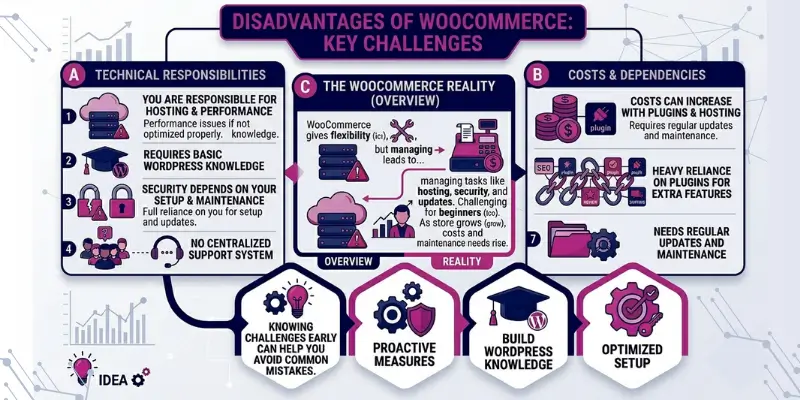
WooCommerce gives you flexibility, but it also comes with responsibilities. You need to manage technical tasks like hosting, security, and updates on your own. It may feel challenging for beginners who want a simple setup. As your store grows, you may also face higher costs and maintenance needs.
Knowing these challenges early can help you avoid common mistakes.
Key Disadvantages
- Requires basic WordPress knowledge
- You are responsible for hosting and performance
- Security depends on your setup and maintenance
- Costs can increase with plugins and hosting
- Heavy reliance on plugins for extra features
- Needs regular updates and maintenance
- Performance issues if not optimized properly
- No centralised support system
1. Requires Basic WordPress Knowledge
WooCommerce works inside WordPress, so you need to understand how it works. Tasks like installing plugins, updating themes, and managing pages are part of daily use. Beginners can learn it, but it takes some time.
Key points:
- Learning curve for beginners
- Requires basic WordPress skills
- Easier if you already have experience
When this becomes a problem:
If you are completely new, the setup may feel confusing at first.
Simple fix: Follow step-by-step tutorials and start with basic features only.
2. Self-Hosting Responsibility
You need to choose and manage your own hosting provider. This includes handling speed, uptime, and server performance.
Key points:
- You manage the hosting setup
- Performance depends on hosting quality
- Better hosting improves speed and stability
When this becomes a problem:
Cheap hosting often leads to slow websites and downtime.
Simple fix: Choose reliable hosting instead of the cheapest option.
3. Security Responsibility
WooCommerce does not manage security for you. You need to protect your store from threats by updating plugins and using security tools.
Key points:
- Regular updates required
- Security depends on your setup
- Backups are essential
When this becomes a problem:
Outdated plugins or weak security can lead to hacking risks.
Simple fix: Keep everything updated and use a trusted security plugin.
4. Extra Costs Can Add Up
WooCommerce is free, but running a store has costs. You may need paid plugins, themes, and better hosting as your store grows.
Key points:
- Hosting and domain costs
- Premium plugins may be required
- Costs grow with business size
When this becomes a problem:
Costs increase when you need advanced features or better performance.
Simple fix: Start with essential tools and upgrade only when needed.
5. Plugin Dependency
Many features in WooCommerce depend on plugins. You often need multiple plugins to run your store smoothly.
Key points:
- Heavy reliance on plugins
- Risk of compatibility issues
- Can affect website performance
When this becomes a problem:
Too many plugins may slow down your site or cause conflicts.
Simple fix: Use only trusted plugins and avoid unnecessary ones.
6. Time and Maintenance Required
WooCommerce needs regular maintenance. You must update plugins, check performance, and fix issues when they appear.
Key points:
- Not a “set and forget” system
- Requires regular updates
- Needs time and attention
When this becomes a problem:
If you ignore updates, your site may break or slow down.
Simple fix: Set a weekly schedule for updates and checks.
7. Performance Issues (If Not Optimized)
WooCommerce can become slow if not configured properly. This usually happens with poor hosting or too many plugins.
Key points:
- Speed depends on the setup
- Poor optimization affects performance
- Requires basic optimization
When this becomes a problem:
Large stores or high traffic can slow down your site.
Simple fix: Use good hosting, optimize images, and limit plugins.
8. No Centralized Support
WooCommerce does not have a dedicated support team. Support depends on plugins, hosting providers, or community forums.
Key points:
- No single support system
- Depends on third-party help
- May require technical support
When this becomes a problem:
If something breaks, you may need to contact multiple sources.
Simple fix: Use well-supported plugins and keep a developer contact if possible.
How does WooCommerce handle scalability and performance?
WooCommerce can support both small and large online stores, but its performance depends on how you set it up. It does not manage speed or scaling for you like hosted platforms do. Most performance issues come from poor hosting, too many plugins, or a lack of optimization. With the right setup, WooCommerce can handle high traffic and large stores without problems.
✔ Scalability (Can It Grow With Your Business?)
WooCommerce is flexible and can grow with your business over time. You can start with a small store and expand to hundreds or even thousands of products. Many growing businesses use WooCommerce successfully as they scale.
What happens in real cases:
Most stores run smoothly at the start. Problems usually appear when traffic increases or the product count grows.
Main causes of scaling issues:
- Cheap or shared hosting
- Large product catalogues
- Growing database (more orders, users, and data)
Why this matters: As your store grows, your database also grows. This can slow down your website if not managed properly.
Simple fixes:
- Upgrade to better hosting (VPS or managed WooCommerce hosting)
- Clean and optimize your database regularly
- Use caching and CDN services
Key points:
- Can handle growth if optimized properly
- Suitable for small to large stores
- Scaling depends on hosting and database management
✔ Performance (Speed and User Experience)
WooCommerce performance depends on how your site is built and maintained. A fast store gives a better user experience and helps with SEO. A slow store can reduce conversions and frustrate users.
What happens in real cases:
Most WooCommerce sites slow down when too many plugins are installed or when images are not optimized.
Common causes of slow performance:
- Too many plugins
- Poor-quality hosting
- Large, uncompressed images
- Heavy or poorly coded themes
Why this matters: Even a 1–2 second delay can affect user experience and sales.
Simple fixes:
- Use fast and reliable hosting
- Compress and optimize images
- Install a caching plugin
- Remove unnecessary plugins
Key points:
- Speed depends on setup quality
- Poor optimization leads to slow load time
- Simple improvements can boost performance
WooCommerce does not limit your growth, but it requires proper setup to perform well.
Well-optimized store → fast and scalable
Poorly managed store → slow and difficult to handle
If you invest in the right setup early, WooCommerce can support your business for the long term.
WooCommerce vs Other Platforms: Which fits your business?
Choosing the right platform depends on your goals, budget, and technical comfort. Some platforms are easier to use but offer less control. Others give full flexibility but require more effort to manage. Understanding these differences will help you pick what actually fits your business.
Quick Comparison
| Factor | WooCommerce | Shopify | BigCommerce |
| Cost | Low starting cost, but increases with hosting and plugins | Monthly fee + transaction fees | Monthly fee, no extra transaction fees |
| Ease of Use | Medium (needs basic WordPress knowledge) | Very easy (beginner-friendly) | Easy, but slightly more complex than Shopify |
| Control | Full control (open-source, fully customizable) | Limited control (platform restrictions) | More control than Shopify, but still limited |
| Scalability | High (depends on hosting and optimization) | High (handled by platform) | High (built-in scaling) |
✔ When WooCommerce Is a Better Choice
WooCommerce works best if you want flexibility and control. It suits users who are ready to manage their website or work with a developer. It is also a good option if you want to grow without paying platform fees.
Best for:
- Businesses that want full ownership
- Users familiar with WordPress
- Stores planning long-term growth
- SEO-focused websites
✔ When Shopify Is a Better Choice
Shopify is designed for ease of use. It handles hosting, security, and performance for you. This makes it a good choice for beginners or those who want a simple setup.
Best for:
- Beginners with no technical skills
- Users who want a quick setup
- Businesses that prefer less maintenance
✔ When BigCommerce Is a Better Choice
The BigCommerce platform is similar to Shopify but with more built-in features. It requires less reliance on plugins and can handle larger stores out of the box.
Best for:
- Growing businesses need built-in features
- Stores with larger product catalogs
- Users who want less plugin dependency
No single platform is “best” for everyone.
Choose WooCommerce if you want control and flexibility
Choose Shopify if you want simplicity and ease
Choose BigCommerce if you want built-in features with less setup
The right platform is the one that matches your skills, budget, and long-term business goals.
WooCommerce Alternatives
WooCommerce works well for flexibility and control, but some users prefer platforms that reduce technical work or come with built-in features. These alternatives solve different problems depending on how you want to run your store.
✔ Shopify
Shopify is a fully managed platform where hosting, security, and updates are handled for you. It removes the need for manual setup or plugin management. Everything is built into one system, which reduces technical effort.
What makes it different:
- No plugin dependency
- No hosting setup required
- Everything is managed in one place
✔ BigCommerce
BigCommerce includes many e-commerce features by default, reducing the need for extra plugins. It is designed to support larger stores with less technical setup. Most tools are already built into the platform.
What makes it different:
- More built-in features
- Less reliance on third-party plugins
- Managed performance and scaling
✔ Easy Digital Downloads
This platform is built specifically for selling digital products. It is lighter and more focused compared to full e-commerce systems. It removes unnecessary features for physical product selling.
What makes it different:
- Focus only on digital products
- Simple checkout system
- Lightweight structure
✔ Sellfy / Podia
These platforms are designed for creators who want to sell content-based products. They combine selling tools with content hosting in a simple system. They reduce technical setup and focus on ease of use.
What makes it different:
- Built for creators and educators
- Combines content + selling tools
- Minimal setup required
Instead of replacing WooCommerce, these platforms solve specific needs:
- Less technical control → Shopify
- Built-in ecommerce system → BigCommerce
- Digital-only selling → Easy Digital Downloads
- Creator-focused selling → Sellfy / Podia
The right choice depends on whether you want control (WooCommerce) or convenience (hosted platforms).
Who Should Use WooCommerce?
WooCommerce is best for users who want full control over their online store and are ready to manage a bit of setup and maintenance. It works well for different types of businesses, especially those planning to grow over time. It is flexible, but not fully managed, so it suits users who want independence in how their store works.
Small Business Owners
WooCommerce is a strong option for small business owners who want to start selling online with a low initial cost. You can begin with a simple store and expand step by step as your sales grow.
Real scenario:
A local clothing shop wants to sell products online without paying monthly platform fees. WooCommerce allows them to build a store and grow slowly without switching platforms later.
Why it fits:
- Low starting cost
- Full control over the store
- Easy to scale later
Bloggers Who Want to Sell Products
Bloggers can turn their content into income using WooCommerce. You can add products directly inside blog posts and convert readers into customers.
Example: A food blogger shares recipes and sells an ebook or cooking guide directly from their website.
Why it fits:
- Combine content and selling
- Easy monetization of traffic
- Strong SEO advantage
Freelancers and Service Providers
Freelancers can use WooCommerce to sell services, bookings, or digital downloads. It works well for people who want to manage everything from their own website.
Real scenario: A graphic designer sells logo packages or accepts booking requests directly through their website.
Why it fits:
- Sell services or digital products
- Custom pricing options
- Professional online presence
Growing eCommerce Stores
WooCommerce works well for growing businesses that need flexibility. As your product range and traffic increase, you can scale your store with better hosting and optimization.
Example: An online store starts with 20 products and grows to 1,000+ products over time with improved hosting and performance setup.
Why it fits:
- Scalable structure
- Full customization options
- No platform restrictions
WooCommerce is a good choice if you want control, flexibility, and long-term growth. It works best for users who are ready to manage or learn the basics of running an online store.
It is ideal for people who want to build, grow, and customize their store instead of relying on a fully managed system.
Who Should NOT Use WooCommerce?
WooCommerce is powerful, but it is not the right choice for everyone. It requires some technical setup, regular maintenance, and basic WordPress understanding. If you prefer a fully managed system, it may feel overwhelming. In some cases, simpler platforms are a better fit.
✔ Non-Technical Users
- Not ideal for users with zero technical knowledge
- Requires handling plugins, updates, and hosting
- May need developer help for advanced changes
For example, Someone who wants everything handled automatically without learning website basics.
✔ People Who Want a Very Easy Setup
- Not built for instant, plug-and-play use
- Needs initial setup on WordPress and hosting
- Takes more steps compared to Shopify-style platforms
Example: A user who wants to start selling within minutes without setup work.
✔ Users With No Time for Maintenance
- Requires regular updates and monitoring
- You must manage security and performance
- Not fully “set and forget”
Example: A business owner who cannot spend time managing website updates or fixes.
Common Mistakes to Avoid in WooCommerce
Many people struggle with WooCommerce, not because the platform is weak, but because of poor setup and maintenance. Small mistakes can affect speed, security, and sales. If you avoid these issues early, your store performs much better and stays stable as it grows.
Using Too Many Plugins
- Installing unnecessary plugins slows down your website
- It can also cause conflicts between features
- Some plugins may stop working after updates
Better approach: Only install essential and trusted plugins that you actually need.
Choosing Cheap Hosting
- Low-quality hosting leads to slow loading speed
- Your store may go down during traffic spikes
- It affects user experience and SEO rankings
Better approach: Use reliable hosting designed for wordpress or WooCommerce.
Ignoring SEO Setup
- Without SEO, your products may not appear on Google
- You lose free organic traffic opportunities
- Poor structure affects long-term visibility
Best approach: Optimize product pages, use keywords, and write helpful content.
Not Updating Regularly
- Plugins and themes that are outdated can create a security risk
- It may break parts of your website
- Performance issues can increase over time
Best approach: Update WordPress, plugins, and themes on a regular schedule.
Key Considerations Before Choosing WooCommerce
Most people think WooCommerce problems come later, but in reality, they usually start from the setup stage. I’ve seen many stores run smoothly at first and then slow down or become difficult to manage just because a few basic decisions were ignored. If you get these things right early, WooCommerce can run surprisingly well even as your store grows.
Hosting Choice:
Hosting is the base of your entire store. If it’s weak, everything else feels slow, no matter how well your site is built. This usually shows up when traffic increases or when multiple users start browsing and checking out at the same time.
Small stores often start on cheap shared hosting because it looks fine in the beginning. The problem starts later when pages take longer to load, especially during product searches or checkout.
What actually works in real cases:
Stores that switch to reliable WooCommerce-optimized hosting usually notice a clear improvement in speed and stability, especially during sales or traffic spikes.
Plugin Selection: WooCommerce depends heavily on plugins, and this is where many beginners go wrong. It’s easy to install plugins for every small feature, but each one adds extra load to your website.
I’ve seen stores with 25+ plugins struggling with slow dashboards and delayed checkout responses, even when the hosting was decent.
A practical approach that works:
Keep only what directly supports sales, payments, or essential store functions. Everything else should be optional, not necessary.
Maintenance Plan: WooCommerce is not something you set up once and forget. It needs regular attention in the background, even if your store is small.
Most issues like broken layouts, checkout errors, or security warnings don’t happen suddenly. They usually come from missed updates or ignored warnings over time.
In real situations:
Stores that update regularly and take backups rarely face serious downtime. The ones that ignore maintenance usually end up fixing bigger problems later under pressure.
If you handle these three areas properly, WooCommerce can run smoothly even as your store grows from a few products to a large catalogue.
Surprising Facts about WooCommerce
- WooCommerce powers 4.17 million to 4.47 million active online stores worldwide, making it one of the most widely used eCommerce platforms.
- It holds around 20%–33% of the global e-commerce website market, depending on how data is measured.
- Over 7 million downloads of the WooCommerce plugin have been recorded on WordPress.
- WooCommerce runs on WordPress, which powers about 40%+ of all websites on the internet, giving it a massive ecosystem advantage.
- The average downloads per day of WooCommerce is 30,000 to 50,000.
- The platform supports 67+ languages, ensuring you can connect with people around the world.
- It is considered the most used eCommerce platform by number of stores globally, ahead of Shopify and BigCommerce in store count.
- Thousands of plugins and themes are available, allowing store owners to customize almost every part of their website without building from scratch.
Conclusion
WooCommerce offers strong flexibility, full control, and many ways to grow an online store. It works well for users who want to build something long-term with WordPress. At the same time, it also brings responsibilities like hosting, updates, and plugin management.
Understanding both sides is important before making a decision. The advantages help you see what WooCommerce can do for your business. The disadvantages remind you of what you will need to manage on your own.
In the end, it’s all about balance. If you want control and are ready to handle some technical work, WooCommerce can be a great choice. If you prefer a simple, fully managed system, other platforms may fit better.
Now it’s your turn to decide what suits your goals best.
FAQs about Advantages and Disadvantages of WooCommerce
WooCommerce gives you full control over your online store. You can customize almost everything based on your needs. It also works well with WordPress for SEO and content marketing.
WooCommerce needs regular updates and maintenance. You also have to manage hosting and security yourself. The use of too many plugins can cause your website to slow down.
WooCommerce is better if you want full control and customization. Shopify is better if you want an easy, ready-made setup. The right choice depends on your technical comfort and business goals.
Yes, WooCommerce can handle large stores if it is properly optimized. Good hosting and performance setup are very important. Without optimization, large stores may become slow.
It can be good for beginners who are willing to learn WordPress basics. The setup is simple, but managing plugins and updates takes time. Many beginners start small and improve step by step.
People choose WooCommerce because it offers flexibility and no sales commission. You can build any type of online store. It also gives full ownership of your website and data.



- Be Respectful
- Stay Relevant
- Stay Positive
- True Feedback
- Encourage Discussion
- Avoid Spamming
- No Fake News
- Don't Copy-Paste
- No Personal Attacks
- Be Respectful
- Stay Relevant
- Stay Positive
- True Feedback
- Encourage Discussion
- Avoid Spamming
- No Fake News
- Don't Copy-Paste
- No Personal Attacks
