How Do I Enable Free Shipping With WooCommerce Subscriptions? (3 Methods, Step by Step)
Published: 18 Oct 2026
Quick answer: How to Enable Free Shipping With WooCommerce Subscriptions
To enable free shipping with WooCommerce Subscriptions, add the Free Shipping method to your shipping zone and choose a condition, such as no restrictions, a minimum order amount, or a Recurring Product Discount coupon with “Allow free shipping” enabled. Before launching, test a renewal order to ensure it works correctly.
I configured free shipping with WooCommerce Subscriptions for a Fiverr client who runs a clothing store in the United States. The goal was simple: subscribers should see free shipping at checkout and on every renewal. The shipping zone took minutes to set up. Testing the renewal took longer, and it turned out to be the most important part.
I learned that getting free shipping to appear at checkout is only half the job; the renewal order needs to be checked separately to make sure the shipping rule holds up.
The same question keeps coming up in WooCommerce support forums. A store owner sees free shipping on the first order, then worries that renewals will carry a shipping charge later.
You turned on free shipping in WooCommerce. It works on normal products. But your subscribers still see a shipping charge. Or the initial order gets free shipping, but shipping fees apply to each renewal.
That confusion is common. A subscription creates a first order and then a new renewal order each billing period. Each one needs its own shipping rule to work. Once you understand how it works, fixing the issue becomes straightforward.
In this guide, I’ll show you how to enable free shipping with WooCommerce Subscriptions in three ways. Each method has its own steps. You will also learn how to test a renewal before real customers see it.
Why Free Shipping Matters for Subscription Stores
Shipping costs push buyers away. Baymard Institute puts the average documented cart abandonment rate at 70.22%, based on 50 studies. Its survey also found that 42% of US online shoppers had abandoned a cart because they were just browsing. Among the rest, these were the top reasons:
| Reason for abandoning a cart | Share of shoppers |
| Extra costs too high (shipping, tax, fees) | 40% |
| Delivery was too slow | 20% |
| Checkout too long or complicated | 17% |
Source: Baymard Institute, Cart Abandonment Rate Statistics, last updated September 22, 2025.
Subscriptions raise the stakes. A shopper sees the shipping charge at sign-up and knows it repeats every billing period. A $5 charge on a monthly box adds up to $60 a year. Free shipping removes that doubt at the moment of purchase.
What to Check Before You Start
A few things need to be ready first. Check this list now. It saves time later.
- WooCommerce Subscriptions is active. This paid extension creates recurring products and renewal orders. WooCommerce.com listed it at $279 per year in October 2026, so check the current price. The recurring shipping rules explained in this guide are handled through it.
- You have a physical subscription product. A virtual product has no shipping, so free shipping does not apply to it.
- You have a shipping zone for your customers. Free shipping only appears inside a zone. A customer outside every zone sees no shipping method.
- You have admin access. You’ll adjust the shipping settings and set up coupons.
- You have a staging site. Test shipping changes there first. A mistake on a live store affects every active subscriber.
3 Methods to Enable Free Shipping With WooCommerce Subscriptions
You can set up free shipping for WooCommerce Subscriptions in three ways, depending on your store’s needs. You can offer free shipping on every order, use a minimum order amount, or apply a recurring coupon. Let’s look at each method step by step.
Method 1: Setting Up Free Shipping for All Subscriptions
With this method, all subscribers get free shipping on their first payment and every renewal. It uses a coupon, so you can limit it to subscription products. Use it when you want a simple promise: “Free shipping on every box.”
Step 1: Navigate to Your Shipping Zone
Log in to your WordPress dashboard. Open WooCommerce → Settings → Shipping in your WordPress dashboard. Click the zone that covers your subscribers, such as “United Kingdom.” No zone yet? It doesn’t choose the shipping method automatically for the customer.
Step 2: Add the Free Shipping Method
Inside the zone, click Add shipping method. Choose Free shipping. Click Add shipping method to confirm.
Step 3: Configure the Free Shipping Rule
Click Edit under Free Shipping. Find Free shipping requires… and pick a rule.
- No requirement (labelled N/A in older versions) makes free shipping available for every order in that zone. That includes one-time products, not only subscriptions.
- A valid free shipping coupon shows free shipping only when a coupon unlocks it. Pick this for subscription-only free shipping.
For this method, choose A valid free shipping coupon. Click Save changes.
Step 4: Create a Subscription-Specific Free Shipping Coupon
Now build the coupon that unlocks it.
- Go to Marketing → Coupons → Add coupon.
- Enter a code, such as FREESHIPSUB.
- Set Discount type to Recurring Product Discount.
- Leave the amount at 0 if you only want free shipping. Apply the coupon in a test cart to confirm it works on your version.
- Tick Allow free shipping.
- Leave Active for x payments empty to cover every renewal.
- Click Publish.
Why a recurring coupon? WooCommerce documents that a Recurring Product Discount coupon with free shipping enabled makes shipping free on all recurring payments. It also applies only to subscription products. A standard cart coupon does not give you that renewal coverage.
You can also set a limit in Active for x payments. The limited-payment coupon guide says the discount ends after those payments, but free shipping stays on.
Step 5: Auto-Apply the Coupon
A coupon only works if customers enter it. Most will not. You have two options:
- Share the code in your checkout banner or welcome email.
- Use a plugin that applies the coupon automatically (see Method 3).
One more detail matters. A free shipping coupon only makes the Free shipping option available. It does not select it for the customer. If your zone also offers flat rate shipping, the customer can still pick it. Remove the extra methods from that zone, or hide them with a rule plugin.
Step 6: Test a Sign-Up and a Renewal
Add a subscription to the cart in a private browser window. Apply the coupon. Check the initial order shipping line. Then check the recurring totals section. Both should show free shipping.
Then process a test renewal. You can find the testing steps in the section below, titled “How to Test a Renewal Before Going Live.”
Best for: stores that want free shipping on every subscription payment.
Method 2: Free Shipping With a Minimum Order Amount
This method gives customers free shipping when their cart total reaches a certain amount.
Customers do not need a coupon. It also nudges subscribers toward bigger plans. The catch is the renewal, because the renewal total can differ from the first payment.
Setting Up Minimum Amount Free Shipping
Step 1: Open the Free Shipping method. Navigate to WooCommerce → Settings → Shipping. Open your zone and click Edit under Free shipping.
Step 2: Choose the minimum rule. Set Free shipping requires… to A minimum order amount. Enter your amount in Minimum order amount.
Step 3: Decide how coupons count. Tick Apply minimum order rule before coupon discount if you want the full price to count. Leave it unticked if the discounted total should count. WooCommerce’s Free Shipping guide explains this option.
Step 4: Save and test. Click Save changes. Add a subscription below the minimum, then above it. Free shipping should appear only above it.
How to pick the amount. Start with your margin, not a guess. Here’s an example using sample numbers:
- Subscription price: $24 per month
- Product cost: $9
- Shipping cost to you: $5
- Payment fee (about 3%): $0.72
- Left after free shipping: $24 − $9 − $5 − $0.72 = $9.28
If $9.28 still pays for your time and returns, you can offer free shipping at $24. If it doesn’t, increase the minimum order amount or raise the product price.
In this example, that is a 38.7% margin per box. Shipping alone takes 20.8% of the price. Over a 12-month subscription, free shipping costs you $60 per subscriber ($5 × 12 boxes).
The lower your price, the harder shipping hits your margin. This table keeps the same costs ($9 product cost, $5 shipping, 3% payment fee). These are sample numbers, so replace them with your own figures.
| Subscription price | Shipping as % of price | Left per box after costs | Margin |
| $15 | 33.3% | $0.55 | 3.7% |
| $24 | 20.8% | $9.28 | 38.7% |
| $40 | 12.5% | $24.80 | 62.0% |
| $60 | 8.3% | $44.20 | 73.7% |
A $15 plan leaves almost nothing after free shipping. You’ll need to raise the plan’s price or set a minimum order amount.
.
Making It Work With Recurring Totals
The first payment and the renewal can differ. A sign-up fee raises the first payment. A free trial lowers it. A discount can change both. So a cart can qualify on day one and fail at renewal.
Follow these steps to avoid surprises:
- Find your recurring price. Open the product and note the subscription price, not the sign-up fee.
- Compare it with your minimum. If the recurring price sits below the minimum, renewals may not qualify.
- Check the recurring totals. Add the product to the cart and read the recurring totals section. It shows what customers pay at each renewal, including shipping.
- Fix any gap. Lower the minimum to the recurring price, or switch to Method 1.
- Process a test renewal. Confirm the renewal order shows no shipping charge.
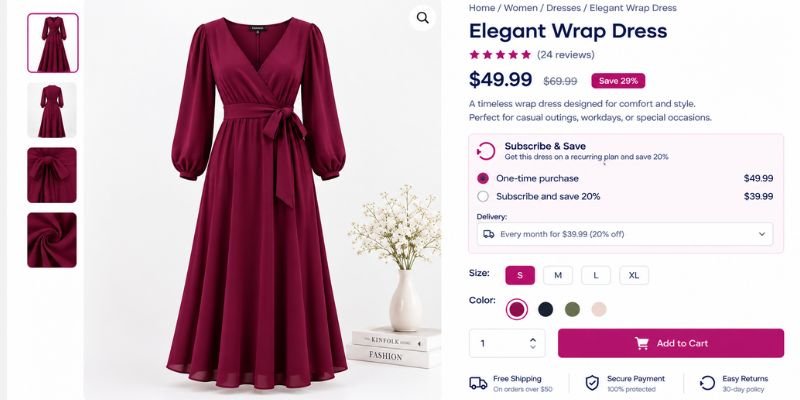
When testing this setup on staging, check the WooCommerce and WooCommerce Subscriptions versions first. Then compare the initial order with the renewal order to see whether the minimum order rule keeps free shipping in place. The recurring total, rather than the first payment alone, is what matters here.
Best for: stores that sell different plan sizes and want to reward larger ones.
Method 3: Use a Plugin for Advanced Control
The built-in settings cover most stores. Use a plugin if you need more control over shipping rules. Install one when WooCommerce’s built-in settings don’t meet your needs.
When You Need a Plugin
- You want free shipping for subscription products only.
- You want free shipping on renewals only.
- You want the coupon to apply automatically.
- You want other shipping options to disappear when free shipping is available.
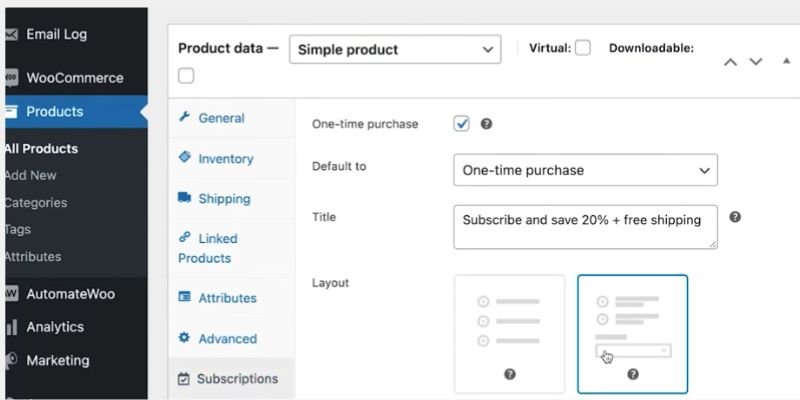
- You sell the same product as a one-time purchase and as a subscription, and want free shipping on the subscription option only.
Recommended Plugins
- Conditional Shipping and Payments (SomewhereWarm): Builds rules from cart conditions. Its subscription conditions, such as Recurring Package and Product on Subscription, help with renewals-only setups. The developer’s tutorial walks through the logic.
- WooCommerce Smart Coupons: Applies coupons automatically at checkout. Use it to auto-apply the Method 1 coupon.
- Disco: Applies discounts and free shipping based on cart conditions, so customers never need a code.
Check each plugin’s compatibility with your WooCommerce version before you buy. Setting names also change between versions.
Setting It Up With a Plugin
This setup covers the most common plugin case: subscribers get free shipping, and one-time buyers pay your flat rate. It uses Conditional Shipping and Payments. Older versions call the screen Restrictions. I used rules like these for the clothing store I set up for a client. A video walkthrough shows the same flow on screen.
Step 1: Install and activate the plugin. Go to Plugins → Add New, or upload the plugin file. Then click Activate.
Step 2: Keep both shipping methods in your zone. Follow Steps 1 to 3 of Method 1. Add the Free Shipping method and set it to No requirement, so the plugin rules decide when it shows. Leave the Flat Rate shipping method in the same shipping zone.
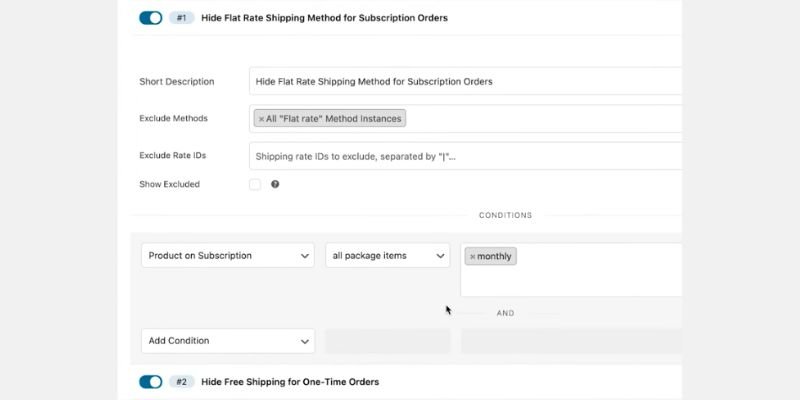
Step 3: Hide flat rate for subscription orders. Go to WooCommerce → Settings → Restrictions and add a restriction.
- Set the action to exclude shipping methods, and pick all your Flat Rate instances.
- Add the condition Product on Subscription.
- Choose the modifier All items in package.
- Pick the billing period, such as monthly or weekly.
- Save your changes.
Step 4: Hide free shipping for one-time orders. Add a second restriction.
- Exclude your Free Shipping instances.
- Use the same condition, Product on Subscription.
- Choose the modifier Not all items in package, with the same billing period.
- Save your changes.
Step 5: Decide how mixed carts should behave. With the “all items” modifier, one regular product in the cart removes free shipping. To give free shipping whenever a subscription is in the cart, switch the modifier to in package (and not in package for the rule that hides free shipping). Change both rules, then check the checkout to confirm Free Shipping is the only option.
Step 6: Test three carts. Add a subscription only, a one-time product only, and both together. The subscription cart should show free shipping. The one-time cart should show your flat rate. The mixed cart depends on the modifier you chose. Then process a test renewal.
Best for: stores that sell the same product as a one-time purchase and as a subscription, and want free shipping on the subscription option only.
What Happens After You Set It Up?
The video walkthrough tests these rules in a demo coffee store. The store sells the same product as a one-time purchase and as a monthly subscription. Its flat rate costs $4.95. Here is what the checkout showed:
| Cart | What the checkout showed |
| One-time purchase only | Flat rate at $4.95, no free shipping |
| Subscription only | Free shipping |
| Subscription plus a one-time product (rule set to “all items in package”) | Flat rate shown, free shipping hidden |
| Subscription plus a one-time product (rule changed to “in package”) | Free shipping shown |
The last two rows are the key lesson. One regular product in the cart can remove free shipping if you pick the wrong modifier. Changing it fixed the cart in the demo.
For the clothing store I worked on, I focused on making the shipping rules match the subscription checkout rather than relying on the first order alone. The same principle applies to the renewal: check the shipping line on the generated renewal order and confirm that the intended shipping method is applied. This is the test I recommend before making the setup available to customers.
How Free Shipping Works Differently for Subscriptions
WooCommerce Subscriptions usually charges shipping for the first order and every renewal. WooCommerce’s own documentation says so. It also means free shipping must hold up twice: at checkout and at each renewal.
The store calculates these two moments separately. At checkout, you see the initial order total. You’ll also find a section called Recurring Totals. That section shows what the customer pays at each renewal, including shipping.
| Initial order | Renewal order | |
| When it happens | At checkout | Each billing period |
| Where you check it | Cart or checkout total | Recurring totals section |
| Coupon type that covers it | Standard cart or product coupon | Recurring Product Discount coupon |
| Common failure | Free Shipping never appears | Shipping appears after the first order |
Keep this table in mind. Every method below makes sure the recurring totals also show free shipping.
Real-World Example: Setting Up Free Shipping for a US Clothing Store
I set up free shipping with WooCommerce Subscriptions for one of my Fiverr clients, who runs a clothing store in the USA.
The Client’s Goal:
- Show free shipping at checkout for eligible subscription orders.
- Keep free shipping on every renewal order.
How I Approached It
- Configured the shipping zone: I set up the shipping zone to support the client’s free-shipping requirements.
- Checked the initial checkout: I verified that free shipping appeared at checkout as intended.
- Focused on renewal testing: I checked the renewal separately because a successful initial checkout doesn’t automatically confirm that the shipping rules will work as expected on future orders.
Setting up the shipping zone took only a few minutes. Testing the renewal took longer, but it was the most important part of the process.
My biggest takeaway: Getting free shipping to appear at checkout is only half the job. You also need to check the renewal order to make sure the shipping rule holds up.
If you’re setting up free shipping for WooCommerce Subscriptions, don’t stop after testing the first order. Check the renewal process before considering the setup complete.
Which Method Should You Choose?
| Method 1: Recurring coupon | Method 2: Minimum amount | Method 3: Plugin rules | |
| Best for | Free shipping on every payment | Rewarding larger plans | Subscription-only or renewals-only |
| Covers renewals | Yes | Only if the recurring total qualifies | Yes, by rule |
| Needs a plugin | No, except to auto-apply | No | Yes |
| Main catch | Customers may need to pick it | Renewal total may fall short | Extra cost and setup |
Start with Method 1 if you are unsure. It is the simplest way to promise free shipping on every payment.
Can You Offer Free Shipping Only on the First Order or Only on Renewals?
You cannot do it with a coupon alone. WooCommerce’s developer FAQ explains why. A free shipping coupon only reveals the Free Shipping method. It does not discount the shipping price. A customer picks one shipping method for the whole subscription, so there is no native way to switch methods between the first order and renewals. That FAQ is from 2020, so check your version’s behaviour on staging.
You still have options:
- Charge shipping once. Subscription products have a One Time Shipping option. It charges shipping on the initial order only, so renewals carry no shipping charge. WooCommerce documents it, and it is unavailable when the product has a free trial or an aligned billing date.
- Make renewals free with rules. A conditional shipping plugin can target the recurring package only (see Method 3).
- Build it into the price. Raise the subscription price slightly and offer free shipping everywhere. This makes things easier for customers to understand.
What Happens When Subscriptions and One-Time Products Share a Cart?
A mixed cart holds a subscription and a regular product. WooCommerce Subscriptions rates the first order and the recurring cart as separate shipping packages. The first-order package holds every item. The recurring package holds only the subscription items. Check the cart’s shipping section and the recurring totals to see how each package is priced.
Ask yourself one question before you set a rule: should free shipping apply to the whole cart, or only to the subscription part? If a minimum order amount counts the whole cart, a one-time product can push a small subscription over the line on the first order. The renewal will not include that product, so the renewal may not qualify.
Test a mixed cart on staging every time you change a rule. Look at both totals.
If you use Conditional Shipping and Payments, the condition modifier decides the outcome. All items in package hides Free Shipping unless every item is a subscription. In package keeps Free Shipping when any subscription is in the cart. Method 3 shows where to set it.
How to Test a Renewal Before Going Live
This test takes about ten minutes. Run it on a staging site.
- Place a subscription order in a private browser window. Use a test payment gateway.
- Note the shipping line on the first order.
- In your dashboard, go to WooCommerce → Subscriptions and open the test subscription.
- Go to the order actions menu and click Process renewal.
- Open the new renewal order.
- Check the shipping line. It should show free shipping.
- Check the order email your customer would receive.
My own rule: never publish a shipping change until a renewal order passes this test.
Extra Tips and Best Practices to Enable Free Shipping With WooCommerce Subscriptions
- Test renewals, not only sign-ups. Many shipping issues appear when the customer makes their second payment.
- Keep the rule simple. Complex rules break more often.
- Match your minimum order amount to your recurring price.
- Tell customers that free shipping covers every delivery. Show it on both the product page and checkout page. In Baymard’s survey, 40% of shoppers who left a cart for a reason other than browsing pointed to extra costs.
- If you want customers to see only free shipping, remove the other shipping methods from that zone.
- Review your margins every quarter. Carrier prices change.
- Use a staging site before editing rules for active subscribers.
- Clear your site and browser cache after changing settings. Old pages can show old totals.
Common WooCommerce Subscription Free Shipping Problems and Fixes
Free shipping does not show at checkout. Your customer’s address may sit outside the zone. Add that region to the zone.
Shipping appears on renewals. Your minimum is probably above the recurring price. Lower it, or switch to Method 1.
The coupon applies, but free shipping is not selected. A coupon only enables free shipping. To hide other options, remove them from the shipping zone or use a plugin that can hide them automatically.
The coupon does not apply to a product. Recurring coupons work only for subscription products. Check the product type.
A product gets free shipping even though it shouldn’t qualify. You may have set the rule to No requirement. That frees every order in the zone. Switch to the coupon rule.
A digital subscription still shows shipping. Tick the Virtual box on the product.
Conclusion
You now know how to set up free shipping for WooCommerce Subscriptions. You can use a recurring coupon, a minimum order amount, or a plugin rule. You also know how to check renewal orders before your customers experience any issues.
That last step matters most. A rule that works at checkout but fails at renewal frustrates subscribers and drives cancellations.
Next, test your setup on staging today. Then read your other WooCommerce shipping settings and check that they match your free shipping promise.
FAQs
It can help. Baymard Institute’s data shows extra costs are the top reason for abandonment among shoppers who were not just browsing, at 40%. The average abandonment rate sits at 70.22%. Free shipping removes one of those surprises. It does not fix slow delivery (20%) or a long checkout (17%). Measure your own abandonment rate before and after the change.
Add the Free Shipping option to your shipping zone. Then set a rule: always free, a minimum order amount, or a coupon. For renewals, use a Recurring Product Discount coupon with “Allow free shipping” ticked. Check a renewal order before making the setup live.
No, you don’t need an extra plugin for basic free shipping. WooCommerce includes a Free Shipping option by default. For advanced rules, such as free shipping only on subscription products, you may need a compatible plugin.
Yes, free third-party subscription plugins are available, but their features vary. The official WooCommerce Subscriptions extension is paid, so check a free alternative’s renewal, payment gateway, and shipping compatibility before installing it.
Not always. It depends on your rule. When you select No requirement, free shipping also applies to renewal orders. With a minimum amount, the recurring total must qualify. With a coupon, use a recurring coupon type.
No, not for the basics. WooCommerce and WooCommerce Subscriptions support recurring coupons and minimum order amounts. You need a plugin for subscription-only free shipping, renewals-only free shipping, or automatic coupons.
The initial order and the recurring cart are calculated separately. The first order may get free shipping, but the renewal might not. Check the minimum order amount and make sure you’re using the right coupon type.
Not with a coupon alone. Subscriptions have a One-Time Shipping option that charges shipping once on the initial order. A conditional shipping plugin can also help. Test any setup on staging first.
Yes, for limited-payment coupons. The discount stops after the set number of payments. The free shipping stays on for later renewals.
Use a staging site and a test payment gateway. Place a sign-up order. Then process a renewal from the Subscriptions screen. Check the shipping line on the renewal order.




- Be Respectful
- Stay Relevant
- Stay Positive
- True Feedback
- Encourage Discussion
- Avoid Spamming
- No Fake News
- Don't Copy-Paste
- No Personal Attacks
- Be Respectful
- Stay Relevant
- Stay Positive
- True Feedback
- Encourage Discussion
- Avoid Spamming
- No Fake News
- Don't Copy-Paste
- No Personal Attacks
