How to Optimize WooCommerce Product Pages for SEO (Step-by-Step Guide)
Published: 12 Feb 2026
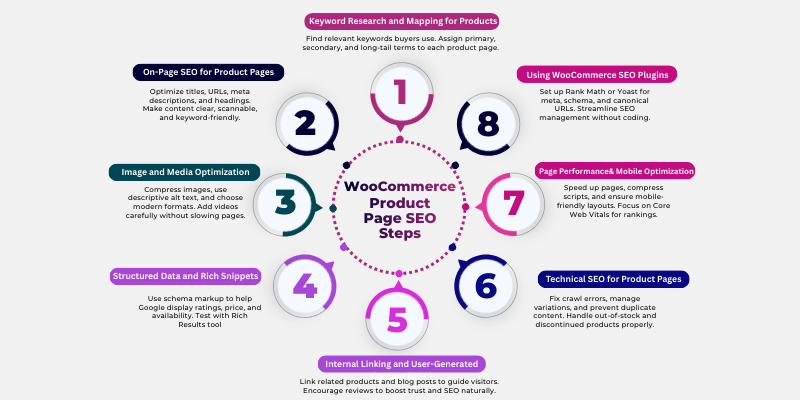
If you’ve ever spent hours setting up your WooCommerce store but still don’t see your products on Google, you’re not alone. Many store owners struggle because they don’t know how to optimize WooCommerce product pages for SEO, even when their products are great. It can be frustrating and confusing to figure out what actually works to get visibility and clicks.
The good news is, it’s rarely about your products; they just need the right optimization. Properly optimized product pages help search engines understand your content, increase visibility, and drive potential buyers straight to your store.
That’s where this guide comes in. I’ll walk you through clear, step-by-step advice that anyone can follow, no prior experience needed. By the end, you’ll feel confident that your product pages are set up to rank, attract visitors, and convert them into customers.
In this guide, I’ll cover everything from keyword research to technical fixes, ensuring your product pages perform their best and turn more visitors into buyers.
What You Need Before You Start
Before you start optimizing your WooCommerce product pages, it’s important to have a few basics ready. These will make the process smoother, faster, and more effective, even if you’re new to SEO.
- A WooCommerce Store Set Up – You need your store ready with products added. Without a functional store, you can’t optimize product pages or test changes. If you’re unsure which one suits your store, this Rank Math vs Yoast for WooCommerce comparison breaks down features, performance, and use cases.
- Basic SEO Knowledge – Understanding keywords, meta descriptions, and headings will help you make smarter optimization decisions and avoid common mistakes.
- Keyword Research Tools – Tools like Google Keyword Planner, Ahrefs, or Rank Math help you find the right search terms your buyers are actually using. This ensures your pages target terms that bring traffic.
- SEO Plugin for WooCommerce – Plugins like Rank Math or Yoast make it easier to manage meta tags, schema, sitemaps, and other SEO settings without coding.
- Product Images and Descriptions – Have high-quality images and basic product info ready. Optimizing visuals and content is a key part of boosting both rankings and conversions.
- A Browser and Basic Tech Comfort – You don’t need to be a developer, but knowing how to navigate WordPress, install plugins, and make edits will save you time and frustration.
Step-by-Step Guide to Optimize WooCommerce Product Pages for SEO
Optimizing your WooCommerce product pages might feel overwhelming at first, but you can do it step by step. Follow these instructions carefully, and you’ll have pages that rank better, attract more visitors, and convert them into buyers.
Step 1. Keyword Research and Mapping for Products
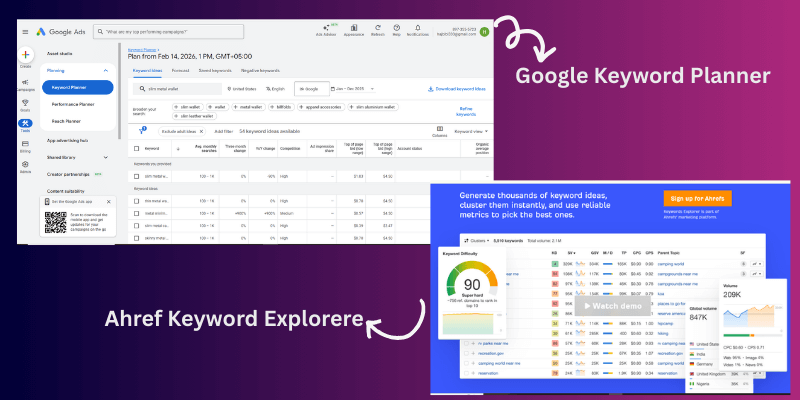
Start by finding the words and phrases people use when searching for your products.
- Use tools like Google Keyword Planner, Ahrefs, or Rank Math to discover relevant keywords.
- Identify primary keywords (main product terms), secondary keywords (variations and modifiers), and long-tail keywords (specific purchase-intent phrases).
- Choose keywords that match buyer intent, not just high search volume. This ensures visitors who land on your page are more likely to buy.
| Product Page | Primary Keyword | Secondary Keywords | Long-Tail Keywords | Buyer Intent |
| Slim Metal Wallet | slim metal wallet | metal wallet for men, wallet gift | best slim metal wallet for men | Purchase-ready |
| RFID Blocking Card Holder | RFID card holder | card wallet, secure wallet | best RFID card holder for travel | Purchase-ready |
What Keyword Mapping Is
Keyword mapping is the process of assigning primary, secondary, and long-tail keywords to each product page. Buyer intent matters most here. People searching “best slim metal wallet for men” are likely ready to purchase, while informational searches like “types of wallets” are not.
Mapping Keywords to Product Pages (PDPs)
Use modifiers like size, colour, and use-case. Include question-based keywords in FAQ sections. Tools like Google Keyword Planner, Ahrefs, and Rank Math can help find the right keywords.
Analyzing Search Intent and SERPs
Look at Google’s SERPs for your keywords. Notice if product listings, featured snippets, or reviews dominate. This gives you clues on what type of content to prioritize.
Step 2. On-Page SEO for Product Pages
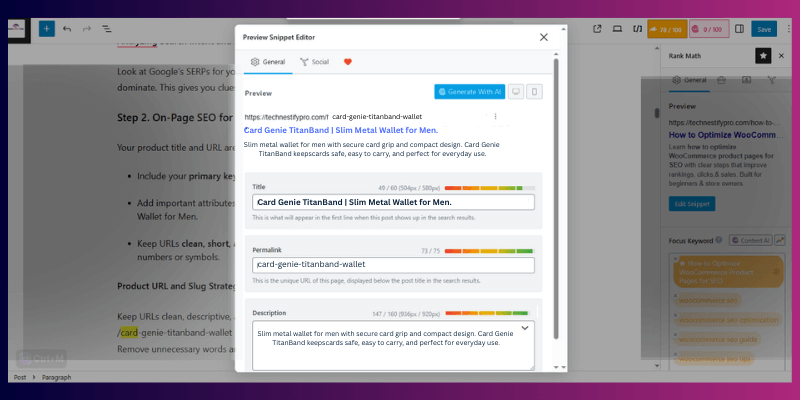
Your product title and URL are the first things users and Google see.
- Include your primary keyword naturally in the title.
- Add important attributes like size, colour, or model. Example: Card Genie TitanBand | Slim Metal Wallet for Men.
- Keep URLs clean, short, and descriptive. Example: /card-genie-titanband-wallet. Avoid random numbers or symbols.
Product URL and Slug Strategy
Keep URLs clean, descriptive, and short:
/card-genie-titanband-wallet is better than /product12345.
Remove unnecessary words and use canonical tags for variations.
Title Tags and Meta Descriptions
Your title should include your primary keyword naturally:
“Card Genie TitanBand | Slim Metal Wallet for Men”.
Meta descriptions should summarize benefits and include keywords to improve CTR.
Heading Structure (H1, H2, H3)
Use a proper hierarchy:
- H1: Product name
- H2: Features, Reviews, FAQs
- H3: Sub-points under features or benefits
Avoid skipping heading levels or repeating keywords excessively.
Product Descriptions: Unique and Persuasive Content
Your descriptions need to inform, persuade, and convert.
- Short Description: Highlight main benefits above the fold. Make it easy for visitors to understand what problem your product solves.
- Long Description: Include detailed features, specifications, and real-life use cases.
- Write original content instead of copying manufacturer descriptions.
- Use headings, bullet points, and naturally place your keywords to help both readers and search engines.
- Avoid copying manufacturer content; write original and buyer-focused text.
- Use categories and tags to help structure your content and improve SEO.
Semantic SEO for WooCommerce Product Page optimization
Search engines now evaluate how well your product page explains the product, not just how many times you use a keyword.
This means your page should cover all the details a buyer expects before making a purchase.
Instead of repeating one keyword like “slim metal wallet”, your page should naturally include related ideas such as:
- wallet size and thickness
- material (metal, aluminium, RFID protection)
- use cases (daily use, travel, security)
- target audience (men, minimalists, professionals)
- benefits (lightweight, durable, secure)
For example, a strong product page doesn’t just say:
👉 “This is a slim wallet”
It explains:
👉 how it fits in pockets
👉 why it’s better than bulky wallets
👉 Who should use it
👉 where it works best (travel, office, daily use)
You can also include related terms like:
- minimalist wallet
- RFID blocking wallet
- compact card holder
- travel-friendly wallet
When your content connects these ideas naturally, it becomes more useful for buyers and easier for search engines to understand.
This helps your product page rank for multiple related searches, not just a single keyword.
Step 3. Image and Media Optimization
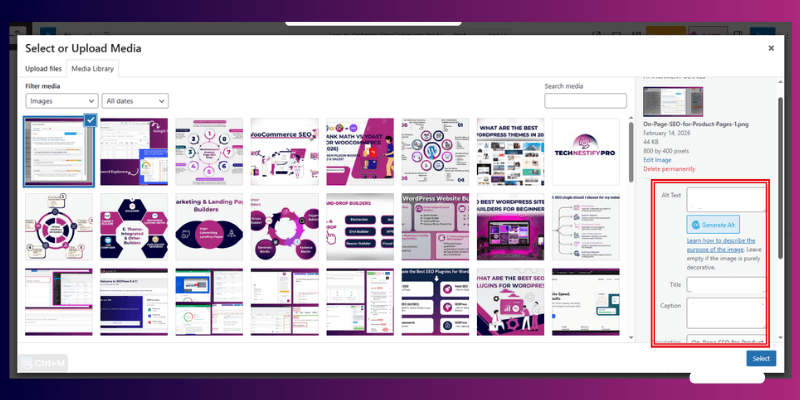
Images make your product pages engaging, but they also need SEO attention.
Image SEO Checklist
- Name image files descriptively with keywords (slim-wallet-titanband.jpg).
- Add alt text for accessibility and SEO.
- Compress images to reduce load time. Use modern formats like WebP.
- Specify image dimensions to prevent layout shifts.
Video and Interactive Media
Videos can boost engagement. Add product videos or 360° views, but make sure they don’t slow your page. Include keywords in video titles and descriptions where possible.
Step 4. Structured Data and Rich Snippets
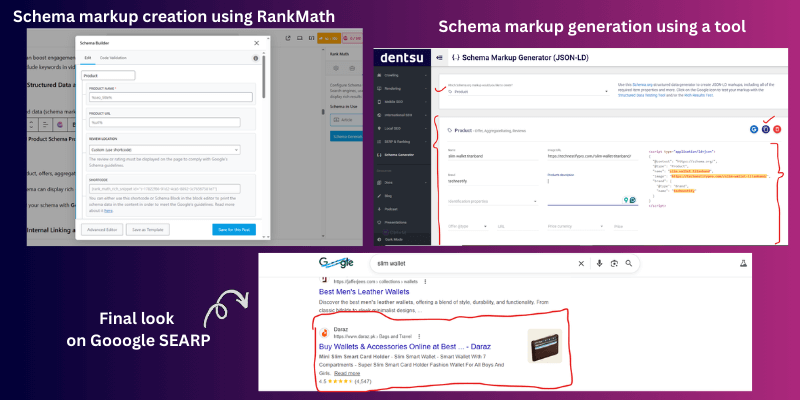
Structured data (schema markup) helps Google understand your product pages, increasing your chance of rich snippets.
Essential Product Schema Properties
Include:
- Product, offers, aggregateRating, review, brand, sku, price, availability
- Schema can display rich snippets in search results, showing ratings, price, and availability.
- Test your schema with Google Rich Results Test to ensure it’s working correctly.
Step 5. Internal Linking and User-Generated Content (UGC)
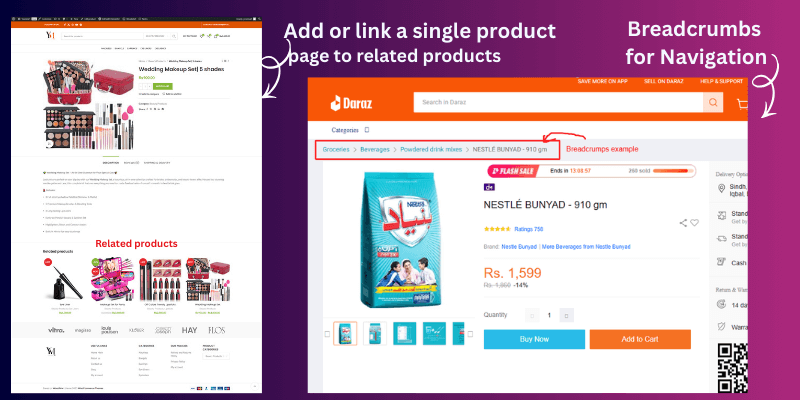
Linking helps users and search engines find your content.
Internal Linking Strategy
- Use breadcrumbs for navigation. So, visitors always know where they are.
- Link from blogs to product pages and vice versa.
- Include related products, upsells, and cross-sells to boost engagement.
The Power of Reviews and UGC
User-generated content boosts both credibility and SEO.
- Ask customers to leave reviews.
- Highlight reviews on the product page to increase trust and keyword variety naturally.
- Respond to reviews to keep engagement active and show Google your page is updated.
- Encourage reviews to build trust and naturally add long-tail keywords.
- UGC improves ranking and CTR.
Step 6. Technical SEO for Product Pages
Technical SEO for product pages include:
Handling Product Variations and Duplicate Content
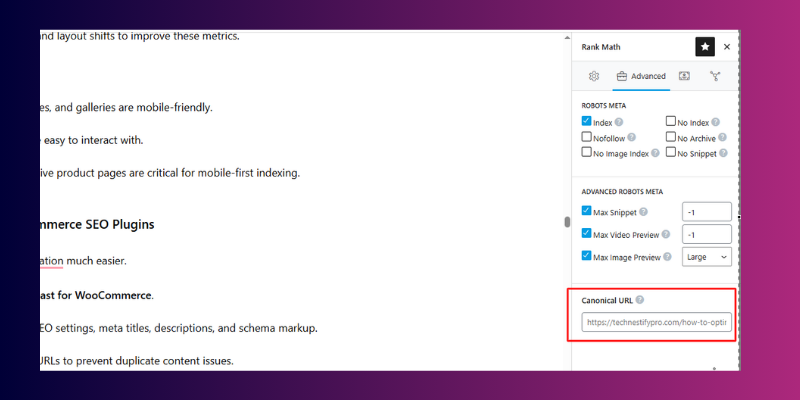
- Use canonical tags to prevent duplicate content from variations.
- Limit faceted navigation to avoid index bloat.
Managing Out-of-Stock and Discontinued Products
- For temporarily unavailable products, mark them as out of stock.
- Permanently discontinued products should be redirected or de-indexed.
Fixing Crawl Errors
- Monitor 404 pages, server errors (5xx), and submitted URL issues in Google Search Console.
- Fix broken links to maintain SEO health.
Step 7. Page Performance and Mobile Optimization
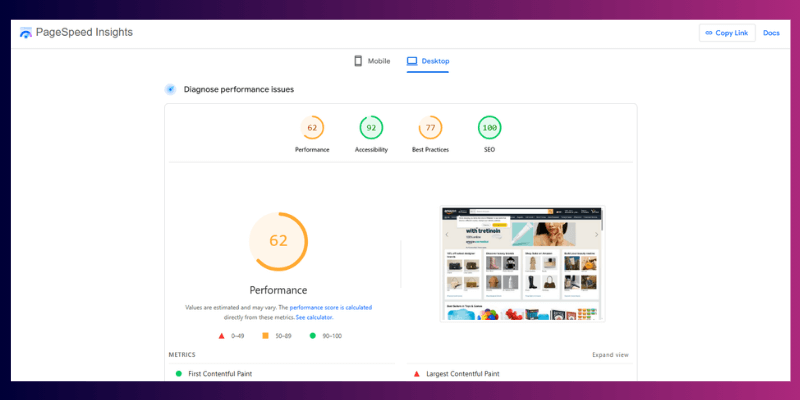
Slow pages and poor mobile layouts hurt rankings and sales.
- Optimize images, compress scripts, and reduce layout shifts.
- Make sure text, buttons, and images are easy to view and tap on mobile.
- Use Google PageSpeed Insights to test page speed and fix any issues it flags.
Core Web Vitals for Product Pages
Focus on:
- LCP (Largest Contentful Paint)
- INP (Interaction to Next Paint)
- CLS (Cumulative Layout Shift)
Optimize images, scripts, and layout shifts to improve these metrics.
Mobile UX Requirements
- Ensure buttons, images, and galleries are mobile-friendly.
- Tap targets should be easy to interact with.
- Fast-loading, responsive product pages are critical for mobile-first indexing.
Step 8. Using WooCommerce SEO Plugins
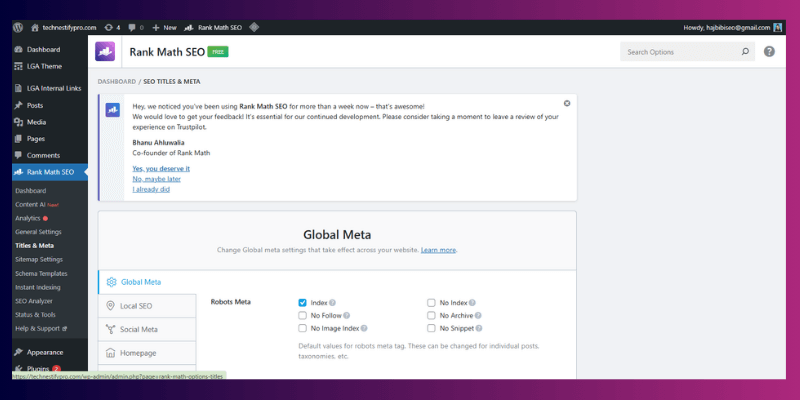
seo plugins make optimization much easier.
- Use Rank Math or Yoast for WooCommerce.
- Set default product SEO settings, meta titles, descriptions, and schema markup.
- Configure canonical URLs to prevent duplicate content issues.
Plugin Configuration Steps
- Set product SEO defaults.
- Configure categories, tags, and breadcrumb settings.
Step 9: Monitor and Update Regularly
SEO isn’t a one-time task.
- Check Google Search Console for impressions, clicks, and errors.
- Update product descriptions, images, and keywords as needed.
- Keep testing and improving pages to maintain and boost rankings over time.
Comparison Table: Optimized vs Non-Optimized E-Commerce Product Pages
Understanding the difference between an optimized and non-optimized product page helps you see exactly where improvements are needed. Google favours pages that are structured, helpful, and provide real value to buyers.
| Factor | Optimized Product Page | Non-Optimized Product Page |
| Keywords | Clear, buyer-intent keywords included in title, headings, and description | Slow pages, poor mobile experience, and layout shifts |
| Content | Unique, informative, and persuasive content that answers buyer questions | Thin, duplicate, or manufacturer-provided content |
| Images & Media | Compressed, high-quality images with descriptive alt text; videos if relevant | Large, slow-loading images; missing alt text; no media enhancements |
| Page Speed & Performance | Fast-loading pages, mobile-friendly, optimized for Core Web Vitals | Slow pages, poor mobile experience, layout shifts |
| Reviews & User Feedback | Real customer reviews, ratings, and testimonials included | No reviews or fake/unhelpful feedback |
| SEO Structure | Proper H1–H3 hierarchy, schema markup, clean URLs, breadcrumbs | Poor heading structure, missing schema, messy URLs |
| Internal Linking | Links to related products, blog posts, and categories to boost authority | Minimal or no internal linking; pages isolated |
| Trust & Security Signals | Clear return policy, HTTPS, stock info, and secure checkout | Missing policies, unsecured pages, incomplete product info |
Why this matters:
Pages that follow these best practices not only rank higher on Google but also convert visitors into buyers more effectively. Internal linking, semantic content, and structured data signal to search engines that your page is authoritative and trustworthy.
Content Strategy to Support Product Page Rankings
Product pages don’t perform well in isolation, especially when many stores are selling similar items. To improve rankings, you need supporting content that directly connects to your products and buyer intent.
Instead of writing general blog posts, focus on content that supports specific products.
For example, if you sell a slim metal wallet, you can create:
- A full guide on “how to choose the best slim wallet for everyday use”
- A comparison guide like “metal wallet vs leather wallet – which is better?”
- A use-case post like “best wallets for travel and security”
Each of these articles should naturally link back to your product page.
This does two things:
- Brings targeted traffic from people already interested in the product
- Strengthens internal linking, helping search engines understand which product pages are important
When your content supports real buying decisions, your product pages gain more relevance and authority in search results.
What Top-Ranking WooCommerce Product Pages Do Differently
If you look at product pages ranking on the first page of Google, you’ll notice clear patterns. They don’t just add keywords; they focus on user experience and clarity.
Here’s what they do better:
- They match search intent clearly
Top pages focus on buyers. They highlight benefits, pricing, and reviews instead of long, unnecessary explanations. - They use structured product data
Pages include product schema with ratings, price, and availability. This helps them appear with rich results in search. - They load fast on all devices
Speed is a major ranking factor. Optimized pages load quickly, especially on mobile. - They include real customer reviews
Reviews add fresh content and improve trust. They also naturally include long-tail keywords. - They keep content simple and scannable
Short paragraphs, bullet points, and clear headings make it easier for users to read and take action.
If your page is missing any of these, improving them can make a noticeable difference in rankings.
How to Increase Clicks on Your Product Pages (CTR Optimization)
Ranking on Google is only half the job. You also need people to click your product page.
Click-through rate (CTR) improves when your title and description clearly show value.
Write Better SEO Titles
Your title should include the main keyword and a strong reason to click.
Example:
- Basic: Slim Metal Wallet
- Better: Slim Metal Wallet for Men – RFID Protection + Lifetime Warranty
Improve Meta Descriptions
Your description should highlight benefits and solve a problem.
Example:
“Looking for a secure and slim wallet? This RFID-blocking metal wallet keeps your cards safe and fits easily in your pocket.”
Use Emotional and Practical Triggers
Words like:
- Secure
- Lightweight
- Durable
- Best for travel
- Limited stock
These help attract attention and increase clicks.
Better CTR sends positive signals to search engines and can improve your rankings over time.
Advanced WooCommerce SEO Strategies
Once your product pages follow the basics, these advanced strategies can help you grow stronger visibility and long-term trust.
Build product pages around keyword intent
Always match the page content with what the buyer wants. If users search to buy, focus on benefits, pricing, and reviews instead of long explanations.
Develop a content strategy for products and blogs
Support product pages with helpful blog posts that answer buyer questions. This builds topical authority and gives you more chances to link back to products.
Build backlinks to high-value product pages
Earn links from relevant blogs, niche websites, and partnerships. Quality links improve credibility and help search engines trust your pages.
Optimize for local SEO when it applies
If you serve a specific location, add local terms, business details, and location pages. This helps nearby buyers find your products faster.
Use paid advertising as a support, not a replacement
Paid ads can bring quick traffic while SEO grows over time. Use ads to test keywords and product demand, then apply those insights to organic SEO.
How These Strategies Work in Real Stores
Many WooCommerce store owners see real improvements when they focus on intent and proper optimization instead of just chasing traffic. Pages written for buyers with clear pricing, honest descriptions, and authentic reviews often convert better than pages filled with generic SEO text.
For example, one of my clients, a US-based WooCommerce store selling slim metal wallets, was struggling with low visibility even though their products were high quality. After implementing a complete SEO strategy, including keyword mapping, optimized product titles and descriptions, structured data, image SEO, and internal linking, their main product page moved from page 4 to the top 5 on Google within three months. Organic traffic increased by 45%, and sales rose by 25%, all without using paid ads. Regular monitoring and updates helped maintain these results over time, showing the power of consistent optimization.
Stores that combine product optimization with helpful blog content usually notice stronger internal linking and longer user sessions. This helps search engines understand the site better and builds topical relevance over time.
Even a few high-quality backlinks from niche-relevant blogs or partnerships can outperform dozens of low-quality links, boosting authority and visibility. Local stores that add clear business details, location pages, and local keywords often gain additional traffic from nearby searches, especially on mobile devices.
Paid advertising can complement SEO, providing fast insights into what products and keywords convert best. Many store owners then apply those learnings to organic strategies, saving time and money in the long run.
Trust Signals You Should Add to Product Pages
Search engines and users trust your store more with these small additions:
- Clear return and refund policies
- Visible contact details or support options
- Genuine customer reviews with dates
- Accurate pricing and stock information
- Secure checkout and HTTPS
These elements don’t just help SEO; they improve confidence and buying decisions.
Extra Tips and Best Practices
In this section, I’ll cover small but practical details that often make a big difference. These tips help you fine-tune your product pages, avoid common slip-ups, and keep your SEO efforts consistent over time. You don’t need advanced skills to apply them, just a bit of attention and regular checks.
- Use one main keyword per product page
Focus on one primary keyword and support it with related terms. This keeps your page clear and avoids confusion for search engines. - Avoid duplicate product descriptions
Never copy text from suppliers or other pages on your site. Search engines prefer original content written for real users. - Keep important content above the fold
Show key benefits, price, reviews, and the buy button early. This improves user experience and reduces bounce rate. - Use simple language that your buyers understand
Write for customers, not search engines. Clear wording helps users stay longer and take action. - Don’t overload pages with keywords
Forced keywords make content hard to read. Use them naturally where they fit. - Link to related products
Internal links help users explore more items and help search engines crawl your store better. - Update old product pages regularly
Refresh descriptions, images, and specs when needed. Fresh updates signal relevance. - Show stock status clearly
Keep availability accurate. Misleading stock info frustrates users and hurts trust. - Test pages on mobile before publishing
Always check how your product pages look and work on phones. Most shoppers browse on mobile. - Track performance after optimization
Use Google Search Console and analytics to see what improves and what needs fixing.
Why Isn’t the WooCommerce Product Page Ranking? (Common Issues & Fixes)
Even when you follow the right steps, issues can still show up. Most of these problems are common and easy to fix once you know what to look for. This section helps you spot those issues quickly and apply simple solutions without stress.
- Products don’t appear on Google
This usually happens when pages aren’t indexed. Submit your sitemap in Google Search Console and check that product pages are not set to “noindex.” - Product pages rank but get no clicks
Weak titles and meta descriptions often cause this. Rewrite them to clearly show the product benefit and match what buyers are searching for. - Duplicate content across products
Similar descriptions confuse search engines. Write unique descriptions and adjust variations with clear differences. - Images don’t show in Google results
Missing or generic alt text is a common issue. Add short, descriptive alt text that explains what’s in the image. - Slow-loading product pages
Large images and too many plugins slow things down. Compress images and remove plugins you don’t actually need. - Too many keywords on one page
Overuse makes content hard to read. Stick to one main keyword and use related terms only where they fit naturally. - Out-of-stock products lose traffic
Removing page breaks from rankings. Keep the page live, mark it as out of stock, and suggest similar products. - Poor mobile experience
Buttons may be too small or the text hard to read. Test pages on mobile and adjust layout and font sizes. - Reviews not showing in search results
Missing schema often causes this. Enable product and review schema using an SEO plugin. - Search engines can’t crawl product pages
Crawl errors block visibility. Fix broken links, 404 pages, and server errors inside Search Console.
Security, Performance & Beyond WooCommerce SEO
Securing your store and keeping it fast is just as important as on-page SEO.
- Implement security best practices
Use SSL/HTTPS, strong passwords, and regular backups. A secure store builds trust with buyers and search engines. - Optimize speed and performance
Compress images, use caching, and minimize unnecessary plugins. Fast pages improve rankings and keep shoppers from leaving. - Ensure categories and tags are SEO-friendly
Clear, descriptive categories and tags help both users and search engines find products easily. Avoid empty or duplicate category pages.
WooCommerce Product SEO Checklist
Use this checklist to make sure no step is missed. Each item reflects proven best practices for visibility and usability:
✅ Complete keyword mapping for every product page
✅ Clean URLs, optimized titles, and meta descriptions
✅ Unique, scannable product descriptions that highlight benefits
✅ Image SEO handled (alt text, compression, and proper formats)
✅ Structured data validated for rich results
✅ Reviews enabled and internal links added
✅ Canonical URLs set for product variations
✅ Fast loading pages and mobile-ready performance
Following this checklist ensures your store meets technical, content, and user experience standards that Google trusts.
Turn Your Product Pages into Revenue Engines
Well-optimized pages do more than rank; they convert visitors into customers.
- Guide buyers with structured content and internal links
Clear headings, product details, and related links keep shoppers engaged and improve navigation. - Track, test, and update regularly
Monitor page performance, tweak titles, descriptions, and images, and refresh outdated content. Continuous improvements signal relevance and build authority. - Focus on the full experience
Combining security, speed, content quality, and user engagement turns product pages into powerful revenue-driving assets.
Conclusion
So, friends, you’ve now learned how to optimize WooCommerce product pages for SEO in a clear and practical way. From choosing the right keywords to improving content, images, speed, and structure, each step helps search engines understand your products better and helps real buyers trust your store. When these improvements work together, your product pages become easier to find, easier to use, and more likely to turn visitors into customers.
The next step is action. Start with one product page and apply what you’ve learned today. Small changes often lead to visible results, especially when done consistently. Track what improves, learn from the data, and then repeat the same process across your store.
If you’re ready to go deeper, explore related guides on e-Commerce SEO plugins, keyword research for product pages, and site speed optimization. These resources build on this guide and help you refine your strategy over time.
Keep improving, stay consistent, and keep testing. Every optimized product page moves your store closer to stronger visibility, better traffic, and steady growth.
FAQs About WooCommerce SEO
SEO takes time, so results are not instant. Small improvements can show within a few weeks. Strong rankings usually take a few months, depending on competition. Consistent updates help speed things up.
A blog is not required, but it helps. Blog posts support product pages by answering buyer questions. They also create internal linking opportunities.
Yes, organic SEO works without ads. You need proper keywords, clear content, and good page structure. Ads help faster, but SEO builds long-term traffic.
Focus on one main keyword. Add a few related terms naturally in the content. Avoid trying to rank for too many keywords on one page.
Yes, they help search engines, and users understand the product. Unique descriptions perform better than copied text. They also improve trust and conversions.
No, deleting pages can hurt rankings. Keep the page live and show out-of-stock status. You can suggest similar products instead.
Both Rank Math and Yoast work well. Rank Math offers more features in the free version. Choose the one that feels easier for you to manage.
Yes, optimized images improve speed and visibility. Alt text helps images appear in search results. Smaller image sizes also improve user experience.
Reviews add fresh content and build trust. They also support rich results in Google. More real reviews often lead to better engagement.
Yes, beginners can handle it step by step. You don’t need coding skills to start. Simple changes can bring noticeable improvements.
10. Can beginners do WooCommerce product SEO on their own?
Yes, beginners can handle it step by step. You don’t need coding skills to start. Simple changes can bring noticeable improvements.



- Be Respectful
- Stay Relevant
- Stay Positive
- True Feedback
- Encourage Discussion
- Avoid Spamming
- No Fake News
- Don't Copy-Paste
- No Personal Attacks
- Be Respectful
- Stay Relevant
- Stay Positive
- True Feedback
- Encourage Discussion
- Avoid Spamming
- No Fake News
- Don't Copy-Paste
- No Personal Attacks
