How to Find an Affordable WordPress Website Design Service
Published: 16 Mar 2026
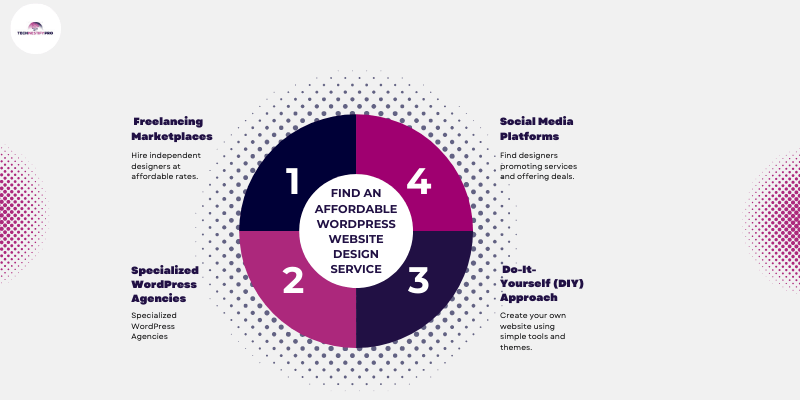
Finding an affordable WordPress website design service can feel confusing, especially if you’re new to building websites. With so many designers, agencies, and tools available, it’s hard to know where to start. With so many options and varying prices, it’s easy to worry about overspending or hiring the wrong designer.
This guide will show you four effective ways to find a professional WordPress design service that fits your budget and business needs, making the process simple and stress-free.
WordPress makes it easy for beginners to build a professional website without coding. You can customize designs, add essential features, and manage content yourself. The challenge is finding a designer or service that delivers quality without breaking your budget, and that’s exactly what this guide will help you do.
What Is an Affordable WordPress Website Design Service?
An affordable WordPress website design service provides professional design, functionality, and support without costing thousands of dollars. It covers essential services like layout design, responsive design, theme customization, plugin integration, basic SEO setup, and website security, all tailored to fit a budget-friendly price.
What WordPress Designers Usually Provide
WordPress designers provide essential services to ensure your website looks professional, works smoothly, and stays secure:
- Website Layout and User-Friendly Design – Creates a clear layout so visitors can navigate easily, improving user experience.
- Responsive Design for Mobile Devices – Ensures the site works on phones, tablets, and desktops automatically.
- Theme Customization – Adjusts themes to match your brand, colours, and business goals.
- Plugin Integration – Installs and configures plugins for features like contact forms, SEO, and security.
- Basic SEO Setup – Sets up seo plugins, meta titles, and descriptions so your site can appear in search results.
- Website Security and Backups – Installs security tools and backup systems to protect your site from attacks or data loss.
Why WordPress Is a Popular Choice for Websites
WordPress is popular because it is easy to use, flexible, and powerful. Beginners can manage content without coding, and professionals can customize designs using thousands of themes and plugins. It supports blogs, business websites, and e-commerce stores, making it a versatile platform for all types of websites.
Easy to Manage Content
- Add blog posts, images, and pages without coding knowledge
- Dashboard is intuitive, beginner-friendly, and quick to learn
Flexible Design Options
- Supports blogs, service websites, online portfolios, and e-commerce stores
- Businesses can create websites that match their brand style easily
Thousands of Themes and Plugins
- Free and premium options available
- Add features like contact forms, booking systems, galleries, and payment gateways
Works Well for Blogs, Business Websites, and Online Stores
- Supports all types of websites
- WooCommerce allows seamless online store creation
How Much Does WordPress Website Design Cost?
The cost of a WordPress website varies depending on the designer’s experience, the number of pages, and the required features. Understanding typical pricing helps you plan a realistic budget.
Average Price by Type of Designer:
- Freelancers:
- Basic website: $200–$1,500
- Pros: Affordable, flexible, ideal for small projects
- Often work independently, which lowers overhead costs
- Basic website: $200–$1,500
- Web Design Agencies:
- Basic website: $2,000–$10,000+
- Pros: Full-service packages including design, branding, and long-term support
- Typically have larger teams and higher overhead, so costs are higher
- Basic website: $2,000–$10,000+
What Factors Affect the Cost of a WordPress Website Design?
The cost of a WordPress website depends on several key factors. Understanding these points can help you plan your budget better.
- Number of Pages – More pages require more design and content work. A five-page site is cheaper than a twenty-page site.
- Custom Design vs Template Design – Custom designs take more time and expertise, while pre-made templates reduce cost.
- WooCommerce or E-Commerce Features – Online stores need product pages, payment systems, and extra security, which increase the price.
- SEO Optimization – Advanced SEO setup requires extra technical work, adding to the cost.
- Website Maintenance Plans – Ongoing services like updates, backups, and security monitoring can affect overall pricing.
4 Proven Ways to Find an Affordable WordPress Website Design Service (What Works Best)
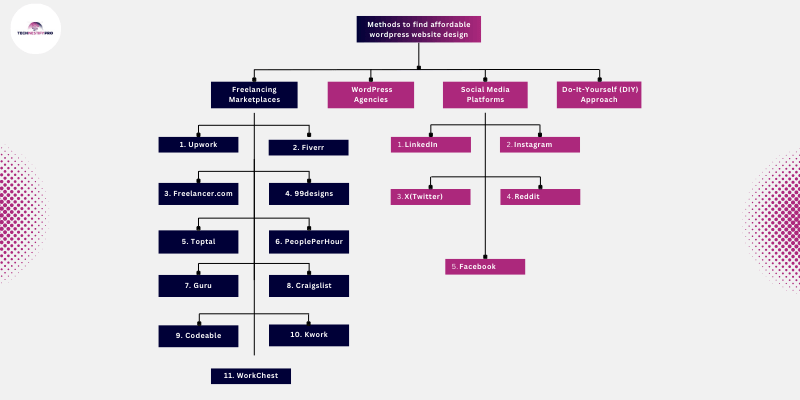
You can find an affordable WordPress website design service through freelance marketplaces, specialized WordPress agencies, do-it-yourself website builders, and social media platforms. Each option offers different pricing, so beginners can choose a solution that fits their budget and website needs.
Many beginners think freelance marketplaces are the only option, but several alternatives exist for different project requirements.
Below are four proven ways to find reliable and budget-friendly WordPress design services.
1. Freelancing Marketplaces
2. Consider Specialized WordPress Agencies
3. Do-It-Yourself (DIY) Approach
4. Find Affordable WordPress Designers on Social Media
1. Freelancing Marketplaces
Freelancing marketplaces are one of the most popular ways to find affordable WordPress website designers. These platforms connect you with thousands of independent professionals worldwide, often at a lower cost than traditional agencies. Freelancers typically handle everything from custom themes to plugin integrations, and many offer fast delivery and flexible pricing.
Here are 11 major freelancing marketplaces where you can find WordPress designers, along with practical tips for beginners:
| Marketplace | Best For | Typical Pricing & Timeline |
| Upwork | Verified professionals, projects of any size | Hourly: $15–$150+, Fixed-price: $200–$2,500, Timeline: 1–6 weeks |
| Fiverr | Small projects, quick setup | $50–$500 per gig, Delivery: 3–14 days |
| Freelancer.com | Multiple bids, competitive pricing | Hourly: $10–$60, Fixed-price: $150–$2,000+, Timeline: 1–5 weeks |
| 99designs | Creative, design-focused projects | Contests: $299–$1,299, Direct hire: $500–$3,000+, Timeline: 1–4 weeks |
| Toptal | Complex projects, highly skilled professionals | Hourly: $60–$150+, Project: $2,000–$10,000+, Timeline: 2–8 weeks |
| PeoplePerHour | Small businesses and startups | Hourly: $10–$50, Fixed-price: $100–$1,500, Timeline: 1–4 weeks |
| Guru | Project-based or hourly work | Hourly: $10–$60, Fixed-price: $200–$2,500+, Timeline: 1–5 weeks |
| Craigslist | Local, simple projects | $100–$1,000, Timeline: 1–3 weeks |
| Codeable | WordPress-focused, advanced projects | Hourly: $70–$120+, Project: $500–$5,000+, Timeline: 1–6 weeks |
| KWORK | Transparent, fixed-price services | Small/basic: $30–$120, Standard: $150–$500, Timeline: 3–14 days |
| WorkChest | Cost-effective, regional talent | Basic: $100–$400, Intermediate: $400–$1,000, Advanced: $1,000+, Timeline: 7–30+ days |
1. Upwork
Upwork is one of the world’s largest freelancing platforms, connecting businesses with professionals across multiple industries, including web development, design, writing, and marketing. It allows clients to post projects and receive proposals from freelancers with verified profiles, portfolios, and ratings.
Upwork supports both hourly and fixed-price projects, making it flexible for small or large businesses. Its global talent pool and secure payment system make it a trusted platform for long-term collaboration.
What they offer:
- Wide range of WordPress freelancers with different expertise levels
- Options for hourly or fixed-price contracts
- Portfolio and reviews for each freelancer
Best for:
- Businesses looking for verified professionals
- Projects of any size, from simple blogs to full e-commerce websites
Typical pricing and timeline:
- Hourly: $15–$150+ per hour
- Fixed-price projects: $200–$2,500 depending on complexity
- Timelines: 1–6 weeks for standard websites
Questions to ask before hiring:
- Can you provide live examples of previous WordPress websites?
- Are you familiar with SEO, security, and mobile responsiveness?
- What is your typical project timeline and communication method?
2. Fiverr
Fiverr is a popular online marketplace where freelancers offer “gigs” for specific tasks across hundreds of categories, from WordPress websites to graphic design, video editing, and digital marketing. Freelancers set their own prices, making it easy for beginners or small businesses to find affordable services.
Fiverr is known for fast delivery options and package deals, and clients can review ratings, portfolios, and past work before purchasing. Its platform is designed for quick, project-based work with transparent pricing.
What they offer:
- Freelancers offer “gigs” with set prices for specific tasks
- Easy to browse portfolios and customer reviews
- Packages often include website setup, themes, and minor customizations
Best for:
- Small projects and startups with tight budgets
- Quick website setup or specific WordPress tasks
Typical pricing and timeline:
- Starting from $50 per gig
- Delivery time: 3–14 days, depending on the package and complexity
Questions to ask before hiring:
- Does your gig include responsive design and mobile optimization?
- Are revisions included in the package?
- Do you provide guidance on hosting and plugin setup?
3. Freelancer.com
Freelancer.com is a global platform that allows businesses and individuals to post projects and receive competitive bids from freelancers in various fields such as web development, software development, design, and writing. It provides a secure environment with milestone payments, portfolio reviews, and ratings to help clients make informed hiring decisions.
Freelancer.com supports both hourly and fixed-price projects, offering flexibility for projects of any size. Its bidding system often helps clients find cost-effective solutions while comparing multiple freelancers.
What they offer:
- Freelancers submit proposals for posted projects
- You can review bids, portfolios, and ratings before selecting
- Supports both hourly and fixed-price projects
Best for:
- Businesses who want multiple freelancer bids to choose from
- Projects with specific technical requirements
Typical pricing and timeline:
- Hourly: $10–$100+ per hour
- Fixed-price: $150–$2,000+
- Project completion: 1–5 weeks
Questions to ask before hiring:
- Have you worked with WordPress themes and custom plugins?
- Can you show previous client feedback?
- What is your post-launch support policy?
4. 99designs
99designs is a creative-focused platform that connects clients with designers worldwide, specialising in logos, branding, and website design. Businesses can run design contests where multiple designers submit concepts, or hire professionals directly. It’s ideal for those seeking unique, visually appealing solutions with creative input from multiple designers.
The platform includes portfolio reviews, direct communication, and guaranteed satisfaction for clients who want high-quality, professional designs.
What they offer:
- Focus on design-oriented projects
- Offers contests where multiple designers submit concepts
- The direct hire option is also available
Best for:
- Businesses needing custom WordPress website designs
- Companies looking for creative, visually appealing sites
Typical pricing and timeline:
- Contests: $299–$1,299
- Direct hire: $500–$3,000+
- Timeline: 1–4 weeks, depending on project complexity
Questions to ask before hiring:
- Will the design integrate with WordPress properly?
- Can you provide responsive and SEO-friendly layouts?
- Are revisions included?
5. Toptal
Toptal is a premium freelancing platform that connects clients with the top 3% of freelancers worldwide in software development, design, finance, and project management. Every freelancer is rigorously vetted to ensure expertise and reliability.
Toptal is ideal for businesses that need highly skilled professionals for complex or critical projects. The platform emphasises quality, professionalism, and long-term collaboration with experienced talent.
What they offer:
- Highly vetted top 3% of freelancers
- Focused on experienced professionals
- Premium platform with guaranteed quality
Best for:
- Businesses with complex websites or custom development needs
- Companies that prioritize experience and reliability
Typical pricing and timeline:
- Hourly: $60–$150+
- Project-based: $2,000–$10,000+
- Timeline: 2–8 weeks, depending on scope
Questions to ask before hiring:
- Do you handle both front-end and back-end WordPress development?
- Can you provide examples of past e-commerce or business websites?
- What level of ongoing support do you offer?
6. PeoplePerHour
PeoplePerHour is a freelancing platform where businesses can find professionals offering services across design, development, marketing, and more. Freelancers can post hourly offers or fixed-price projects, and clients can communicate, negotiate, and set milestones through the platform.
PeoplePerHour is well-suited for small businesses, startups, or individual entrepreneurs seeking affordable services with flexible arrangements. It also provides secure payments and freelancer ratings to ensure trust.
What they offer:
- Freelancers post hourly or fixed-price offers
- Easy messaging and milestone setup
- Escrow system for safe payment
Best for:
- Small businesses and startups need affordable and quick WordPress work
Typical pricing and timeline:
- Hourly: $10–$50 per hour
- Fixed-price: $100–$1,500
- Timelines: 1–4 weeks for standard websites
Questions to ask before hiring:
- Will you provide a timeline with milestones?
- Do you offer post-launch support?
- Can you handle responsive design and SEO basics?
7. Guru
Guru is an online freelancing marketplace that enables clients to post projects or search for freelancers across categories such as web development, design, and business consulting. The platform features a secure Work Room for managing projects, milestone payments, and detailed freelancer profiles with portfolios and reviews.
Guru is ideal for businesses looking for reliable, project-based, or hourly freelance services. It provides transparency and control over workflow and payments.
What they offer:
- Similar to Freelancer.com, allows project posting and proposals
- Secure Work Room for project communication
- Milestone payment options
Best for:
- Businesses who want multiple quotes for their project
- Companies looking for hourly or project-based freelancers
Typical pricing and timeline:
- Hourly: $10–$60 per hour
- Fixed-price: $200–$2,500+
- Timeline: 1–5 weeks
Questions to ask before hiring:
- Can you show examples of WordPress projects?
- Do you include security and backup setup?
- How do you handle revisions and communication?
8. Craigslist
Craigslist is a local classifieds platform where individuals and small businesses can advertise services, including web development, design, writing, and other professional tasks. Unlike structured freelancing platforms, Craigslist is more informal and often connects clients with local talent directly.
It’s ideal for small, simple projects or businesses looking for cost-effective, local support. Craigslist requires careful vetting, but it can be a fast and affordable option for beginners.
What they offer:
- Local freelancers can advertise services
- Often more affordable due to local competition
- Less structured platform, requires vetting
Best for:
- Businesses looking for local WordPress freelancers
- Small, simple websites on a budget
Typical pricing and timeline:
- $100–$1,000 for basic sites
- Timeline: 1–3 weeks
Questions to ask before hiring:
- Can you provide references or portfolio links?
- Are you familiar with modern WordPress practices?
- Do you offer ongoing support?
9. Codeable
Codeable is a specialized freelancing platform focused exclusively on WordPress development. It connects businesses with pre-vetted WordPress experts for custom themes, plugins, and website optimization. The platform ensures high-quality work, transparent pricing, and certified developers.
Codeable is perfect for businesses that need professional, reliable WordPress solutions with guaranteed expertise and long-term support.
What they offer:
- Focused exclusively on WordPress development
- Pre-vetted WordPress experts
- Handles custom themes, plugins, and site optimization
Best for:
- Businesses needing high-quality WordPress work
- Projects requiring advanced customizations
Typical pricing and timeline:
- Hourly: $70–$120+
- Project-based: $500–$5,000+
- Timeline: 1–6 weeks, depending on complexity
Questions to ask before hiring:
- Can you optimise the website for speed and SEO?
- Do you provide security setup and backups?
- Can you integrate custom features or plugins?
10. Kwork
KWORK is a global freelancing marketplace where professionals offer services across digital marketing, design, development, writing, and more. Freelancers create fixed-price “kworks” that clearly outline deliverables and timelines, making it beginner-friendly for small businesses and startups.
The platform emphasises transparency with ratings, reviews, and secure payments. KWORK is ideal for affordable, small-to-medium projects that need fast delivery.
What they offer:
- Fixed-price “kworks” for web development, WordPress design, graphics, content writing, SEO, and marketing
- Clear deliverables, pricing, revisions, and delivery time listed upfront
Best for:
- Small businesses, startups, and beginners who want transparent pricing
- Projects needing clear, defined services without bidding
Typical pricing & timeline:
- Small WordPress setup/basic design: $30–$120+
- Standard WordPress website design: $150–$500+
- Delivery: 3–14 days, depending on the package
Questions to ask before hiring:
- Does the price include responsive design and SEO setup?
- How many revisions are included?
- Will you set up backups and security?
- Can you help with hosting setup if needed?
11. WorkChest
WorkChest is a freelance marketplace that began in Pakistan and helps connect skilled professionals with clients for web design, development, design, content, and digital services. While many freelancers on the platform are based in Pakistan and South Asia, WorkChest also serves clients and remote workers from other countries.
The platform lets businesses review freelancer profiles, portfolios, and ratings before hiring, making it easier for beginners to find affordable talent. WorkChest works well for startups and small businesses looking for cost‑effective services with strong communication and regional support.
- What they offer:
- Freelance services for web development, WordPress, design, and digital marketing
- Profiles include portfolio, ratings, and client reviews
- Supports freelancers from Pakistan, South Asia, and remote international clients
- Freelance services for web development, WordPress, design, and digital marketing
- Best for:
- Small businesses or entrepreneurs seeking cost-effective services
- Clients who want regional talent with strong communication
- Small businesses or entrepreneurs seeking cost-effective services
- Typical pricing & timeline:
- Basic WordPress site/simple customization: $100–$400
- Intermediate WordPress or e-commerce setup: $400–$1,000
- Custom features/advanced design: $1,000+
- Timeline: 7–30+ days depending on project scope
- Basic WordPress site/simple customization: $100–$400
- Questions to ask before hiring:
- Are you familiar with modern WordPress page builders (Elementor, Divi)?
- Do you include responsive design and basic SEO?
- What post-launch maintenance or support do you offer?
- How fast do you typically respond to messages?
- Are you familiar with modern WordPress page builders (Elementor, Divi)?
Why the Freelancing Marketplace Option Works Well
Freelancing marketplaces provide several advantages:
- Large pool of designers
- Flexible pricing options
- Easy comparison of portfolios and reviews
Clients can review previous work, ratings, and feedback before hiring a freelancer.
Tips for Beginners
Follow these simple steps before choosing a freelancer:
- Review the designer’s portfolio carefully
- Read client feedback and ratings
- Ask whether the designer includes SEO setup and mobile responsiveness
These steps help you avoid poor-quality services.
2. Consider Specialized WordPress Agencies
Some smaller agencies focus only on WordPress development. These agencies often create affordable website packages designed for startups and small businesses.
Benefits of Specialized Agencies
Working with a specialized WordPress agency provides several benefits:
- Experienced WordPress professionals
- Structured project timelines
- Reliable technical support
When This Option Makes Sense
Choosing an agency may work better when:
- Your website requires advanced features
- Your business needs long-term support
- You prefer working with a team instead of one freelancer
Many agencies offer starter packages that include basic design, hosting guidance, and maintenance.
3. Do-It-Yourself (DIY) Approach
Some business owners choose to build their own WordPress website. This approach works well when the budget is limited.
WordPress offers thousands of ready-made themes and beginner-friendly tools.
Tools That Make DIY Easier
Several tools simplify the website-building process:
- Drag-and-drop page builders
- Pre-designed website templates
- Online tutorials and guides
These tools help beginners design a website without coding skills.
Advantages
DIY websites offer several benefits:
- Lowest possible cost
- Full control over design changes
- Valuable learning experience
Challenges
The DIY approach also includes some difficulties:
- Beginners need time to learn WordPress
- Design quality may look basic at first
Many small businesses start with a DIY website and later hire a professional designer to improve the design.
4. Find WordPress Designers on Social Media
Social media platforms help freelancers showcase their work and connect with potential clients. Many designers regularly share portfolio projects, case studies, and client testimonials.
Popular platforms include:
- LinkedIn
- Facebook
- Instagram
Why Social Media Can Work Well
Social media platforms offer several benefits:
- Access to real design portfolios
- Direct communication with designers
- Competitive pricing from freelancers
Search for designers who regularly share completed projects and positive client feedback.
Red Flags to Avoid When Hiring Cheap WordPress Design Services
Affordable services can provide great value, but extremely cheap services sometimes create problems.
Watch for these warning signs:
- No portfolio or previous work examples
- Extremely low prices with unrealistic promises
- Poor communication during early discussions
- No mention of SEO, mobile design, or website speed
A reliable designer should always explain their process and provide examples of previous work.
How to Choose the Right WordPress Designer for Your Project
Even when you find affordable designers, you often struggle to choose the right one. This section guides you through the decision process.
Important factors to consider:
- Review the designer’s portfolio
- Check client testimonials
- Ask about project timelines
- Evaluate communication skills
- Confirm support after the website launch
You can also recommend asking for a short consultation call before starting the project.
Questions You Should Ask Before Hiring a WordPress Designer
Asking the right questions helps you choose a reliable designer.
Consider asking the following:
- Will the website work properly on mobile devices?
- Do you provide theme customization?
- Will you install essential plugins?
- Will you optimize the website for speed and search engines?
- Do you offer website maintenance services after launch?
Clear answers help you understand what you will receive for your budget.
What Features Every Affordable WordPress Website Should Include
Many beginners focus only on the price when hiring a WordPress designer. Cost matters, but the features included in the website matter just as much. A well-built WordPress website should provide the tools that help visitors navigate easily, load pages quickly, and interact with your business.
When you hire an affordable WordPress design service, make sure your website includes these essential features.
Mobile-Responsive Design
Most people browse websites using smartphones. A mobile-responsive design automatically adjusts the layout for different screen sizes so visitors can easily read content and navigate the website on any device.
Website speed affects both user experience and search rankings. A slow website can cause visitors to leave before they even see your content. A good WordPress designer should optimize images, themes, and plugins so the website loads quickly.
Basic SEO Setup
Search engine optimization helps your website appear in search results. Basic SEO setup usually includes installing an SEO plugin, optimizing meta titles and descriptions, and creating a search-engine-friendly site structure.
If you’re planning to go beyond basic setup, you may want to compare professional WordPress SEO services before choosing a provider.
Contact Forms
Every business website should include a contact form so visitors can easily send inquiries. Contact forms help you capture leads and communicate with potential customers without sharing your email publicly.
Security Protection
Website security protects your site from hacking attempts and malware. Designers often install security plugins, enable firewalls, and set up login protection to keep your website safe.
Backup System
A backup system creates copies of your website files and database. If something goes wrong, you can quickly restore the website without losing important data.
Easy Content Management
One of the biggest advantages of WordPress is the ability to update content easily. A properly configured website allows you to add blog posts, update pages, and upload images without technical knowledge.
Tips to Save Money on WordPress Website Design
You can reduce website costs by preparing several things before hiring a designer.
- Prepare Your Website Content in Advance
Create your text, images, and business information before the design process starts. Designers work faster when the content is ready.
Lightweight themes improve website speed and reduce customization costs.
- Start With Essential Pages
Most small business websites start with basic pages:
- Home
- About
- Services
- Contact
You can add additional pages later.
- Choose Reliable Hosting
A reliable hosting improves website speed, security, and uptime. Reliable hosting also reduces technical issues.
Tips for Finding Affordable WordPress Development Services
Finding affordable WordPress development services requires more than simply choosing the lowest price. A good approach helps you balance cost, quality, and long-term value. The following practical tips can help beginners find reliable WordPress developers without overspending.
1. Define Your Requirements
Start by writing down exactly what you need for your website. Decide how many pages you want, what features you need, and whether you plan to add a blog, contact form, or online store.
Clear requirements help developers understand your project quickly. This also prevents unnecessary features that increase the cost.
As an example, a small business website may only require the following:
- Home page
- About page
- Services page
- Contact page
Starting with a simple structure keeps your budget under control.
2. Research and Compare Developers
Take time to research different developers before hiring one. Compare their experience, portfolio, pricing, and client reviews.
Look for developers who show real website examples instead of generic templates. A strong portfolio shows that the developer has real experience with WordPress projects.
Comparing several developers also helps you understand the average market price.
3. Consider Freelancers
Freelancers often provide affordable WordPress services because they work independently. Many skilled developers build websites for small businesses at competitive prices.
Freelance platforms like Upwork or Fiverr allow you to review ratings, previous projects, and customer feedback before hiring.
This option works well for startups and small business owners who want a professional website without paying agency prices.
4. Use WordPress Themes and Plugins
Custom design increases development time and cost. Pre-built themes reduce the workload for developers and help you launch your website faster.
WordPress offers thousands of professional themes that you can customize to match your brand.
Plugins also add useful features such as:
- Contact forms
- SEO tools
- Security protection
- Backup systems
Using reliable themes and plugins can significantly reduce development costs.
5. Use a Minimum Viable Product (MVP)
An MVP website includes only the most important features required to launch your site.
Instead of building a large website at the beginning, focus on essential pages and features. Once your website starts attracting visitors, you can add more pages and advanced functionality.
This approach allows you to control your budget while still launching your online presence.
6. Negotiate Payment Terms
Many developers offer flexible payment options if you discuss the project details clearly.
For example, some developers allow payments in stages:
- Initial deposit
- Mid-project payment
- Final payment after completion
Clear payment terms help both sides manage the project smoothly.
7. Watch for Package Deals
Many developers offer website design packages that include multiple services together.
A package may include:
- Website design
- Basic SEO setup
- Security configuration
- Contact form setup
Package deals often cost less than purchasing each service separately.
8. Consider Outsourcing
Some businesses reduce development costs by hiring developers from different countries where service rates are lower.
Outsourcing allows you to access global talent and competitive pricing. Many experienced WordPress developers work remotely and deliver high-quality results.
However, always check communication skills, time zone compatibility, and previous work before hiring an outsourced developer.
9. Get Recommendations
Recommendations from friends, colleagues, or business owners can help you find reliable developers.
People who have already worked with a developer can share honest feedback about the quality of work, communication, and project management.
A trusted recommendation often saves time and reduces hiring risks.
10. Assess the Support and Maintenance Options
A website requires ongoing updates, security monitoring, and backups.
Before hiring a developer, ask whether they provide support or maintenance services after the website launch.
Reliable support ensures that your website remains secure, fast, and updated.
11. DIY for Simple Tasks
You can reduce development costs by handling small tasks yourself.
For example, you can manage:
- Uploading blog posts
- Adding images
- Editing simple text content
Learning basic WordPress tasks helps you maintain your website without paying for every small update.
12. Communicate Clearly
Clear communication improves the entire website development process.
Explain your goals, design preferences, and budget expectations from the beginning. Share examples of websites you like so the developer understands your vision.
When both sides communicate clearly, the project moves faster and avoids unnecessary revisions.
Affordable WordPress Design vs Cheap Website Design
Many beginners assume that affordable and cheap mean the same thing. In reality, they are very different. Understanding this difference can save you from poor website performance and future repair costs.
Affordable WordPress design focuses on value and quality at a reasonable price. The designer uses reliable themes, proper plugins, and best practices to build a website that works well for visitors and search engines.
Cheap website design often focuses only on offering the lowest possible price. Some providers skip important steps such as performance optimization, security setup, and SEO configuration. This can create problems later, including slow-loading pages, security risks, and poor visibility in search results.
The table below shows the key differences.
| Feature | Affordable WordPress Design | Cheap Website Design |
| Price Approach | Fair pricing based on the work required | Extremely low prices to attract clients |
| Design Quality | Professional layout and user-friendly structure | Basic design with limited customization |
| Website Speed | Optimized themes and images for faster loading | Often slow because of poor optimization |
| SEO Setup | Includes basic SEO configuration | Usually ignores SEO setup |
| Security | Security plugins and protection measures included | Security often overlooked |
| Support | Clear communication and possible post-launch support | Limited or no support after delivery |
| Long-Term Value | Reliable website that supports business growth | May require redesign or fixes later |
A well-designed WordPress website should load quickly, work properly on mobile devices, and allow you to manage content easily. Reliable designers usually follow best practices when building sites on WordPress.
Before hiring a designer, review their portfolio and ask about previous projects. Look for real examples of websites they have built. Client testimonials and clear communication also show professionalism.
Choosing an affordable service with proven experience helps you build a website that supports your business without unnecessary expenses.
What Are the Common Problems When Finding an Affordable WordPress Website Design Service, and How to Fix Them?
- Problem: Choosing the cheapest designer without checking quality.
Fix: Always review portfolios and client feedback before hiring. - Problem: Ignoring mobile responsiveness.
Fix: Make sure the designer creates a responsive site that works on phones and tablets. - Problem: Overpaying for unnecessary features.
Fix: Focus on essential pages and plugins first; add extras later as needed. - Problem: Confusing pricing structures on freelancing platforms.
Fix: Compare quotes carefully and ask what’s included in the price. - Problem: Lack of communication with the designer.
Fix: Set clear expectations and regular check-ins before starting the project. - Problem: Forgetting about SEO and website speed.
Fix: Ask the designer to set up basic SEO and optimize performance from the start. - Problem: Not having a backup or security plan.
Fix: Ensure the designer includes security plugins and regular backups. - Problem: Picking a designer who doesn’t understand your business goals.
Fix: Share your vision, branding, and target audience clearly before the project begins.
Final Thoughts
By following this guide, you now know how to find an affordable WordPress website design service that fits your budget and meets your business needs. You’ve learned the main ways to discover reliable designers, the features a professional website should include, and how to avoid common mistakes. With this knowledge, you can confidently choose the right service and start building a website that looks great and works smoothly.
Next, take action by exploring freelancing marketplaces, checking out specialized WordPress agencies, or even trying a DIY approach if your budget is tight. Prepare your content, define your goals clearly, and communicate with your designer to get the best results. As you gain experience, you can explore advanced tips, optimize your site for SEO, and add more features to make your website even more powerful.
You now have the tools and confidence to get a professional wordpress website without overspending, so take the first step and start creating your online presence today.
A well-designed WordPress website helps your business build trust, attract visitors, and grow your online presence. With the right approach, you can create a strong website that supports your business goals for years to come.
FAQs About Affordable WordPress Website Design
The cheapest option is to use a DIY WordPress setup with a free or low-cost theme and essential plugins. You can start simple and improve your website later as your budget allows.
You can find affordable designers on freelancing marketplaces, specialized small agencies, or even through social media. Compare portfolios, read reviews, and ask about included features before hiring.
The best approach depends on your needs and budget. Freelancers are cost-effective for small projects, agencies offer full-service solutions, and DIY tools let you build a professional-looking site at minimal cost.
Yes, you can focus on essential pages, use pre-designed themes, and hire a freelancer for key customizations. Start small and add features as your business grows.
Yes, WordPress makes it easy to create a basic site yourself. You can always hire a designer later for improvements or custom features.
Check their past work, client reviews, and portfolio examples. Ask questions about mobile responsiveness, SEO setup, and website backups to make sure they meet your needs
Freelancers usually cost less and can be flexible with small projects. Agencies may charge more but offer full-service support, custom designs, and ongoing maintenance. Choose based on your budget and the complexity of your website.
Freelancers usually cost less and can be flexible with small projects. Agencies may charge more but offer full-service support, custom designs, and ongoing maintenance. Choose based on your budget and the complexity of your website.



- Be Respectful
- Stay Relevant
- Stay Positive
- True Feedback
- Encourage Discussion
- Avoid Spamming
- No Fake News
- Don't Copy-Paste
- No Personal Attacks
- Be Respectful
- Stay Relevant
- Stay Positive
- True Feedback
- Encourage Discussion
- Avoid Spamming
- No Fake News
- Don't Copy-Paste
- No Personal Attacks
