What is WordPress? A Beginner’s Guide to the Most Well-Known CMS in the World
Published: 26 Oct 2025
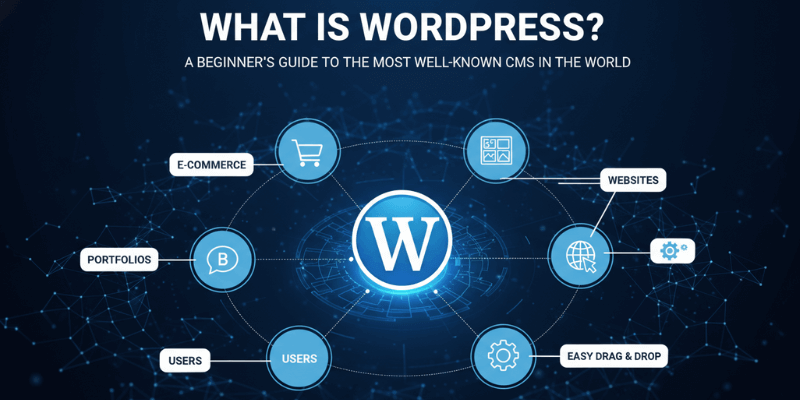
Have you ever wondered how people create websites without knowing a single line of code? The answer is WordPress.
It’s the most popular tool for building websites, powering more than 43% – 45% of the internet. Whether it’s a personal blog, a business site, or even an online store, WordPress makes it possible.
In this beginner’s guide, we’ll explore what WordPress is, why it’s so popular, what you can do with it, and how you can get started today.
1. What is WordPress?
WordPress is an open-source content management system (CMS) for building and managing websites. WordPress was originally created as a blogging platform in 2003, but has since become the world’s most popular tool for building websites.
WordPress is a free platform that helps you create and manage websites or blogs.
It’s what we call a Content Management System (CMS). Think of a CMS as a notebook for the internet where you can write, edit, and organize your website content without any coding.
Example: Using WordPress is like typing in Microsoft Word, but instead of printing the paper, your work appears online as a website.
2. A Short History of WordPress
WordPress started in 2003. It was created by Matt Mullenweg and Mike Little as a simple blogging tool.
Over time, it grew into a powerful CMS that now runs millions of websites around the world. It’s open-source, which means developers everywhere contribute to making it better.
3. WordPress.com vs WordPress.org
There are two types of WordPress, and this often confuses beginners. Here is a short explanation of WordPress.com vs WordPress.org
- WordPress.com → Hosted for you. Easy but limited.
- WordPress.org → You host it yourself. Full control, but you manage hosting and setup.
Example: WordPress.com is like renting an apartment. You follow rules, but maintenance is easy. WordPress.org is like owning a house; you have full freedom, but you handle everything yourself.
| Features | WordPress.com | WordPress.org |
| Hosting | Included | You buy separately |
| Control | Limited | Full |
| Plugins | Restricted | Unlimited |
| Cost | Free & Paid | Hosting + Domain |
4. Why is WordPress So Popular?
WordPress stands out because it’s simple to use, flexible enough for any project, and trusted by millions around the world. Here’s why so many people prefer it:
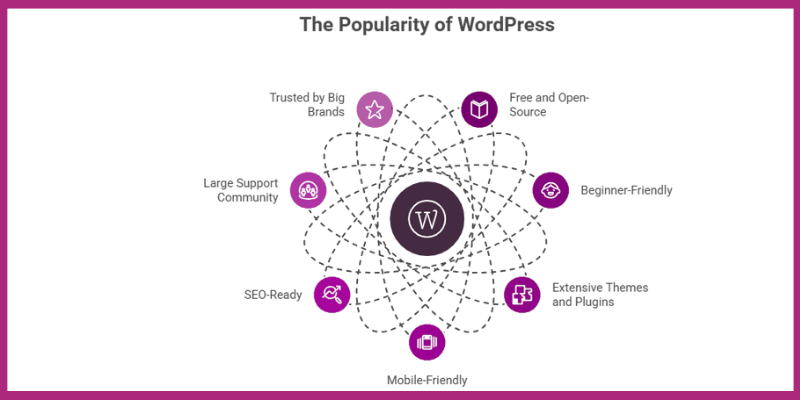
- Free and open-source – anyone can use or customise it without paying a fee.
- Beginner-friendly yet powerful – you can start a blog today and grow it into a full business site later.
- Thousands of themes and plugins – design and add new features in just a few clicks.
- Mobile-friendly by default – every theme adapts to phones and tablets automatically.
- SEO-ready – it’s clean code and plugin options help your pages rank better on Google.
- Large support community – if you ever get stuck, there’s always help available through forums and tutorials.
- Trusted by big brands – BBC, TechCrunch, and Sony use it too.
Example: Even major brands like BBC, TechCrunch, and Sony rely on WordPress. If global companies trust it, it’s a safe bet for your website too.
5. What Can You Build With WordPress?
The flexibility of WordPress makes it possible to create almost any kind of website you want:
- Blogs
- Business websites
- E-commerce stores (with WooCommerce)
- Portfolios and resumes
- Online courses
- Membership sites and forums
Example: A photographer can build an online portfolio. A shop owner can sell products with WooCommerce.
6. What Are the Key Features of WordPress?
WordPress includes everything you need to build, design, and manage a professional website, even with zero coding skills. Here are the main features of WordPress:
- Themes – instantly change your site’s layout and look with free or premium designs.
- Plugins – add features like SEO tools, contact forms, or security protection in minutes. According to wordpress.org, over 60,000 plugins are available.
- Mobile-ready – every WordPress site automatically adjusts to any screen size.
- SEO-friendly – built with clean code and tools that help your content perform better on search engines.
- Scalable – perfect for small blogs, growing startups, or large eCommerce stores.
Example: The Yoast SEO plugin guides you step-by-step to make your content more search-friendly.
7. What Are the Advantages and Disadvantages of Using WordPress?
WordPress is the world’s most popular website builder, but like any tool, it comes with both advantages and disadvantages.
Before you start using it, it’s important to know its strengths and weaknesses so you can decide if it’s the right choice for your website.
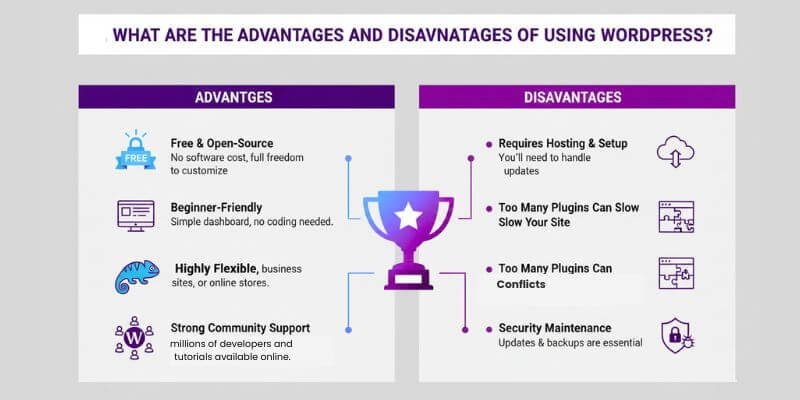
Advantages of WordPress
WordPress offers the freedom to build any type of website with ease. Its simple setup, flexibility, and huge library of themes and plugins make it one of the best choices for beginners and professionals alike.
- Free and open-source – no software cost, and full freedom to customize.
- Beginner-friendly – simple dashboard, no coding needed.
- Highly flexible – works for blogs, business sites, or online stores.
- Strong community support – millions of developers and tutorials available online.
Disadvantages of WordPress
While WordPress is powerful, it does come with a few limitations. Managing hosting, updates, and security can take extra time, especially if you’re new to websites.
- Requires hosting and setup – you’ll need to handle installation and updates.
- Too many plugins can slow your site – only install what you really need.
- Security maintenance – updates and backups are essential to keep your site safe.
Pro Tip: Always use trusted themes and plugins from verified developers to avoid performance and security issues.
8. How Much Does WordPress Cost?
The WordPress software is free, but a functional website usually costs $50–$1,500+ per year, depending on hosting, themes, plugins, and the type of site.
Cost Breakdown by Core Components
- Domain name: ~$10–$20 per year
- Web hosting:
- Shared hosting: ~$3–$5/month (~$36–$60/year)
- Managed WordPress hosting: ~$20–$60/month (~$240–$720/year)
- Shared hosting: ~$3–$5/month (~$36–$60/year)
- SSL certificate: ~$10–$70/year for security
- Premium themes: ~$30–$100 (optional)
- Premium plugins: ~$20–$100+ depending on functionality
Estimated Cost by Website Type
- Personal/blog site: ~$50–$300/year
- Small business site: ~$300–$1,000/year
- E-commerce or advanced sites: ~$300–$1,500+/year
Tip for beginners: Start with free themes, plugins, and shared hosting. Upgrade as your site grows or you need more features.
9. How WordPress Works (Step by Step)
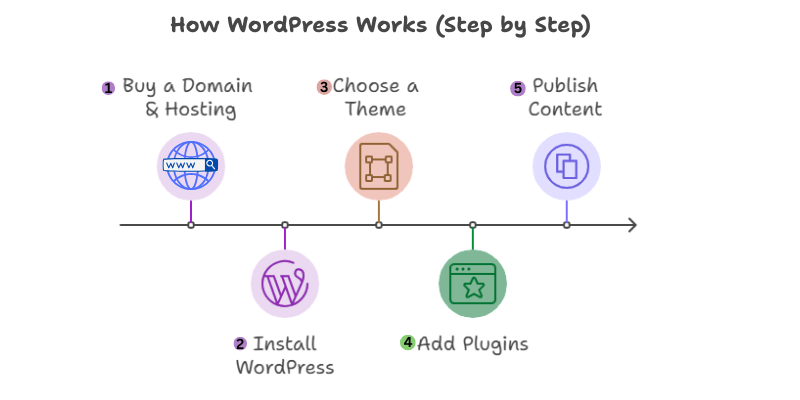
Building a WordPress website is simple, even for beginners. Here’s how it works in a few easy steps:
- Buy a domain and hosting – Your domain is your website’s address, and hosting stores your site online.
- Install WordPress – Most hosts offer a one-click installation, making setup fast and easy.
- Choose a theme – Pick a design that fits your style or brand.
- Add plugins – Enhance your site with extra features like SEO, contact forms, or security.
- Publish your first page or post – Share content, launch your blog, or start your website.
Example: Setting up WordPress is like setting up a smartphone: hosting = phone, plugins = apps, theme = wallpaper.
(Tip: Start with basic themes and essential plugins. You can expand as your site grows.)
10. WordPress Dashboard Basics
The WordPress dashboard is your website’s control centre. Here’s what each section does:
- Posts: Create and manage blog content.
- Pages: Add static content like “About” or “Contact.”
- Media: Upload and manage images, videos, and other files.
- Appearance: Customise your site’s design with themes and layouts.
- Plugins: Add new features such as forms, SEO tools, and security.
- Settings: Control site basics like site title, permalinks, and general options.
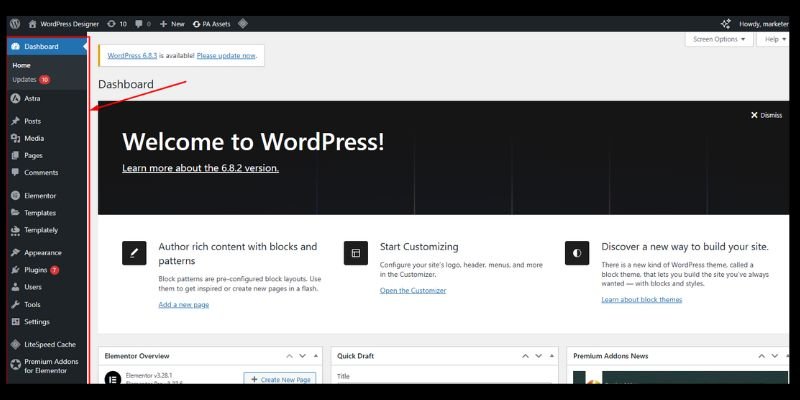
Example: Want to add a contact form? Simply install a plugin, no coding required.
11. Common Misconceptions About WordPress
WordPress is often misunderstood. Let’s clear up some common myths:
- ❌ “It’s only for blogs.” → WordPress powers eCommerce stores, corporate sites, and more.
- ❌ “It’s hard to use.” → The dashboard is simple and beginner-friendly.
- ❌ “You need coding skills.” → Not true. Drag-and-drop builders like Elementor make it easy.
12. Tips for Beginners
Simple tips to get started and maintain a healthy WordPress site:
- Start with a free theme – Choose a clean, simple design for your first site.
- Don’t overload with plugins – Only install essential plugins to keep your site fast and secure.
- Keep WordPress, themes, and plugins updated – Regular updates prevent security issues.
- Always take backups – Protect your site from accidental loss or errors.
- Use a security plugin – Add extra protection against hacks and malware.
Tip: Focus on learning the basics first, then gradually explore themes, plugins, and customisations as your site grows.
Conclusion
So guys, in this article, we’ve covered what WordPress is and why it’s the most popular CMS in the world. WordPress gives you the freedom to build almost any kind of website, whether it’s a blog, a business site, or an online shop, without needing coding skills.
My personal recommendation is to start with WordPress.org if you want full control and long-term growth. It’s free, flexible, and supported by a huge community, which makes it perfect for beginners and professionals alike.
If you’re planning to build your blog, business site, or even an online shop, WordPress is the perfect starting point.
FAQs
Yes, WordPress itself is free software. However, if you use WordPress.org, you’ll need to pay for hosting and a domain. wordpress.com has free and paid plans.
No, you don’t need coding at all. WordPress works with themes and plugins that do the hard work for you. Most tasks are just click-and-done.
Yes! You can create blogs, business websites, online stores, portfolios, and more. WordPress is flexible enough to fit almost any purpose.
wordpress.com is hosted, meaning your site runs on their platform with limits. WordPress.org is self-hosted, giving you full control but requiring hosting and a domain. Think of it as renting vs owning a home.
Yes, WordPress is safe if you keep it updated. You should also update themes and plugins regularly. Adding a security plugin makes your site even safer.
The WordPress software is free. For WordPress.org, hosting usually costs a few dollars per month, plus a domain fee. WordPress.com can be free, but paid plans unlock more features.
Yes! You can make money through ads, affiliate marketing, selling products, or offering services. Many bloggers and businesses earn a full income with WordPress.
A simple blog can be set up in a few hours. Adding advanced features may take longer. With practice, you’ll get faster.
With WordPress.org, yes! You fully own your site and content. With wordpress.com’s free plan, your content sits on their platform and follows their rules. Most people choose wordpress.org for full ownership.
Absolutely! WordPress is designed to be easy for beginners while still powerful for advanced users. With themes, plugins, and a friendly dashboard, anyone can get started.
Yes, it’s SEO-ready. Plugins like Yoast SEO make it even better.



- Be Respectful
- Stay Relevant
- Stay Positive
- True Feedback
- Encourage Discussion
- Avoid Spamming
- No Fake News
- Don't Copy-Paste
- No Personal Attacks
- Be Respectful
- Stay Relevant
- Stay Positive
- True Feedback
- Encourage Discussion
- Avoid Spamming
- No Fake News
- Don't Copy-Paste
- No Personal Attacks
