WordPress.com vs WordPress.org: Which One Should You Choose?
Published: 11 Nov 2025
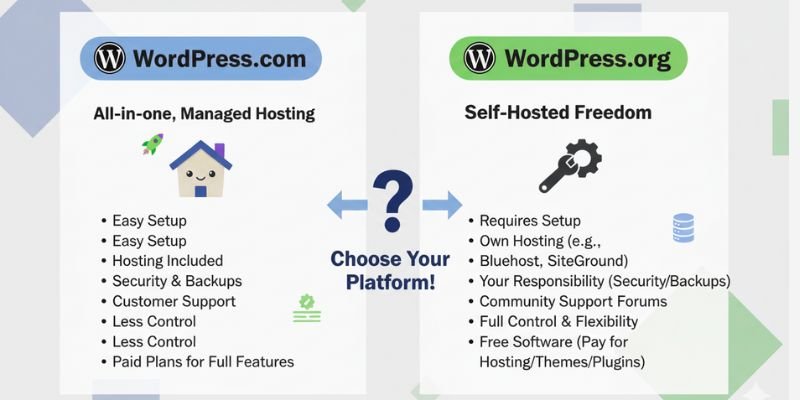
“Should I use WordPress.com or WordPress.org? “
This is the first big question every beginner faces when starting a website. If you’re just starting a website, this question can be confusing.
Both are WordPress, but they’re not the same. One is simple but limited, the other is flexible but needs setup. Choosing the wrong one can cost you time, money, and growth.
In this guide, I’ll explain the key differences, pros and cons, and costs, and give you a clear answer on which WordPress is right for you.
A Quick Refresher: What is WordPress?
WordPress is the world’s most popular tool for building websites. It powers over 43% of the entire internet.
The fact is, there are two variations of WordPress: WordPress.com and WordPress.org. Both use the same software, but they work differently.
Think of it like this:
- wordpress.com is like renting a fully furnished apartment.
- WordPress.org is like owning your own house.
Both are homes, but one gives you freedom while the other gives you convenience.
What is WordPress.com?
WordPress.com is a hosted platform. It takes care of hosting, security, and maintenance for you.
Key Features:
- Hosting included (no setup needed).
- Automatic updates and security.
- Free and paid plans.
- Limited plugins and themes (unless on higher plans).
Who is it for?
- Casual bloggers.
- Students or hobbyists.
- Beginners who don’t want to deal with technical stuff.
It is also possible to create a WordPress.com subdomain website for free. Here is how the WordPress dashboard looks for a WordPress.com subdomain website.
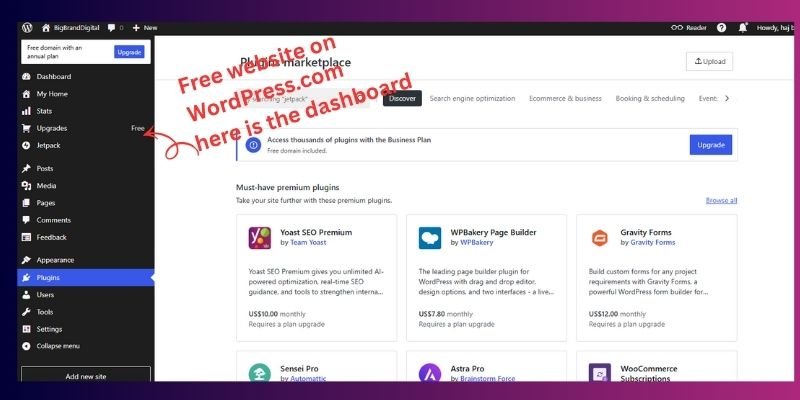
Example: Suppose you just want to start a cooking blog for fun. With WordPress.com, you can sign up and publish your first post in minutes, no hosting, no setup.
What is WordPress.org?
WordPress.org is the self-hosted version. You download the software and host it on your own server (through companies like Bluehost or SiteGround).
Key Features:
- Full control and customization.
- Access to all plugins and themes.
- Ability to monetize your site in any way.
- Scales to large businesses and online stores.
Who is it for?
- Business owners.
- Professional bloggers.
- e-commerce store owners.
- Anyone serious about long-term growth.
Example: If you want to launch an online shop with WooCommerce, you’ll need WordPress.org for full freedom and features.
WordPress.com vs WordPress.org: Quick Comparison
| Feature | WordPress.com | WordPress.org |
| Hosting | Included | Buy separately |
| Control | Limited | Full control |
| Customization | Restricted | Unlimited |
| Plugins | Only on higher plans | All plugins available |
| Monetization | Limited | Full freedom |
| Security | Managed for you | You manage |
| Cost | Free + Paid tiers | Hosting + Domain |
What are the Advantages and Disadvantages of WordPress.com and .Org
Nothing in this world is 100% perfect; everything comes with its own pros and cons. The same goes for WordPress.com and WordPress.org, so let’s explore their strengths and weaknesses.
WordPress.com
✔️ Free plan available
✔️ Easy to set up
✔️ Hosting & updates included
❌ Limited customization
❌ Restricted plugins
❌ Ads on free plan
WordPress.org
✔️ Full control
✔️ Unlimited plugins and themes
✔️ Best for SEO & monetization
❌ Requires hosting & setup
❌ You handle backups/security
❌ Can feel overwhelming for total beginners
Pricing Breakdown
- WordPress.com: Free plan → upgrade to $4–$45/month for more features. Hidden costs for custom domains, plugins, and monetization.
- WordPress.org: Software is free, but hosting costs $3–$15/month + domain ($10–15/year). Optional premium themes/plugins.
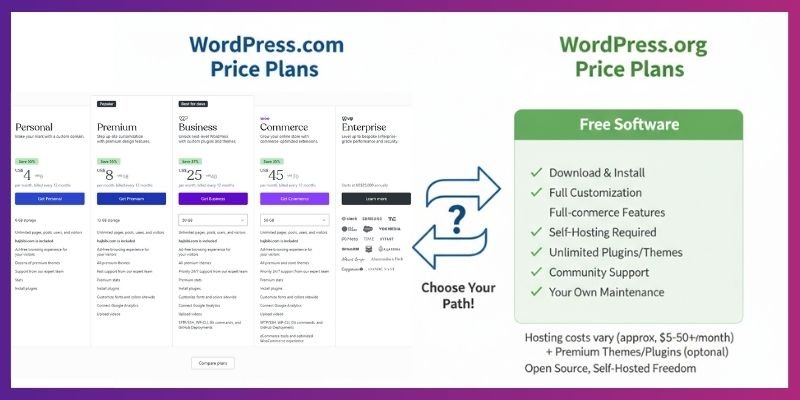
Cost Forecast (3 years):
- WordPress.com premium plan = $540+
- WordPress.org with budget hosting = $300–$400
SEO & AI Overview
- WordPress.org: Best for SEO. You can install Yoast SEO or Rank Math. AI tools like chatbots, content generators, and automation plugins are available.
- WordPress.com: SEO tools are limited unless you buy expensive plans. No freedom to use most AI plugins.
Which Platform is Better for SEO?
WordPress.org is better for SEO because it gives full control over settings, allows advanced plugins, and supports structured data and performance optimization. WordPress.com has limited SEO tools unless you upgrade to a Business plan, and cannot use most advanced plugins.
WordPress.org:
- Full control over SEO settings
- Use plugins like Yoast SEO or Rank Math
- Add structured data, meta tags, and schema
- Optimize for speed, mobile, and AI content tools
WordPress.com:
- Limited SEO unless you purchase the Business plan
- Cannot install advanced seo plugins or AI content tools
Example:
A blogger using WordPress.org added a schema markup plugin and improved page speed with caching. Google traffic increased 2x in 3 months.
Pro Tip: Always use SEO-friendly themes and optimise images for faster load times.
What About Security and Maintenance?
WordPress.com handles security, updates, and backups automatically, making it low-maintenance for beginners. WordPress.org requires you to manage these tasks, but plugins like Wordfence (security) and UpdraftPlus (backups) make it easier.
- WordPress.com: Security, updates, and backups are handled for you.
- WordPress.org: You’re responsible. But with plugins like Wordfence (security) and UpdraftPlus (backups), it’s simple.
Tip: Always keep WordPress, themes, and plugins updated.
Support & Community
- WordPress.com: Email or ticket support (depends on your plan).
- WordPress.org: No official support, but a huge global community, tutorials, and forums.
If you like personal support → WordPress.com.
If you’re okay learning from guides → WordPress.org.
Legal & Ownership Differences
- On WordPress.com, your site follows their rules. Break them, and your site could be shut down.
- On WordPress.org, you own everything: content, domain, and hosting.
How Does Scalability Differ Between Platforms?
One platform is suitable for personal blogs or small websites, but has limited growth potential. The other can scale from a blog to an eCommerce store, membership site, or online school.
- WordPress.com:
- Ideal for personal sites and small blogs
- Limited options for scaling to large businesses or online stores
- Ideal for personal sites and small blogs
- WordPress.org:
- Fully scalable for growing websites
- Supports eCommerce, membership platforms, online courses, and enterprise-level sites
- Fully scalable for growing websites
Pro Tip: Choose WordPress.org if you anticipate growth, high traffic, or advanced functionality in the future.
Which Platform Loads Faster and Offers More Customization?
A: WordPress.com loads fast for small sites but has limited customization. WordPress.org can be even faster with optimization and offers full control over design, themes, and plugins.
- Performance:
- WordPress.com uses managed hosting, so small blogs and personal sites load fast without extra setup.
- WordPress.org can be optimized for even better speed using tools like LiteSpeed Cache, WP Rocket, or a CDN like Cloudflare, making it ideal for high-traffic blogs or eCommerce stores.
- WordPress.com uses managed hosting, so small blogs and personal sites load fast without extra setup.
- Customization:
- WordPress.com free plan limits themes, plugins, and CSS/PHP edits, restricting advanced customization.
- WordPress.org gives full control over themes, plugins, custom CSS, and PHP code, allowing you to build highly unique sites, membership platforms, or online stores.
- WordPress.com free plan limits themes, plugins, and CSS/PHP edits, restricting advanced customization.
Example:
A fitness blogger moved from WordPress.com to WordPress.org, installed Elementor, customized PHP code for a unique design, and optimized caching + CDN. The site now loads 3x faster and supports an online course store.
Pro Tip:
If you anticipate growth, heavy traffic, or advanced design needs, choose WordPress.org and implement caching + CDN for maximum speed and flexibility.
How Do You Migrate from WordPress.com to WordPress.org?
Many users start on WordPress.com and later migrate to WordPress.org for more control and scalability. Migration involves exporting content, setting up hosting and a domain, importing content to the new site, and redirecting old URLs.
Step-by-Step Migration
- Export content from WordPress.com.
- Purchase hosting and a domain for WordPress.org.
- Import content to your WordPress.org site.
- Redirect old URLs to preserve SEO and avoid broken links.
Pro Tip: Use a migration plugin like All-in-One WP Migration and double-check redirects to maintain search engine rankings.
How Do Monetization Options Differ Between WordPress.com and WordPress.org?
WordPress.com has limited monetization options and manages ads unless you upgrade to higher-tier plans. WordPress.org gives full freedom to monetize your site through products, courses, memberships, affiliate links, and ad networks.
- WordPress.com:
- Monetization is limited to Business or higher plans.
- Ads managed by WordPress unless upgraded
- Monetization is limited to Business or higher plans.
- WordPress.org:
- Full freedom for monetization
- Sell products, courses, or services with WooCommerce
- Add affiliate links, membership subscriptions, and ad networks
- Full freedom for monetization
Example:
A blogger initially earned ad revenue on WordPress.com. After migrating to WordPress.org, she added online courses, memberships, and affiliate products, tripling her income.
Who Should Use WordPress.com vs WordPress.org
WordPress.com is best for beginners, hobbyists, or personal sites who want simplicity and low maintenance. WordPress.org is ideal for business websites, online stores, membership sites, and anyone who wants full control over SEO and customization.
| Use Case | Recommended Platform |
| Beginner blog | WordPress.com |
| Hobbyist / Personal site | WordPress.com |
| Business website | WordPress.org |
| Online store | WordPress.org |
| Membership/LMS | WordPress.org |
| Full SEO control | WordPress.org |
Example:
- Sarah, a hobby blogger, chose WordPress.com for her recipe blog.
- Mike, a fitness coach, started on WordPress.com but migrated to WordPress.org to sell courses and memberships, increasing revenue and site flexibility.
Which One Should You Choose?
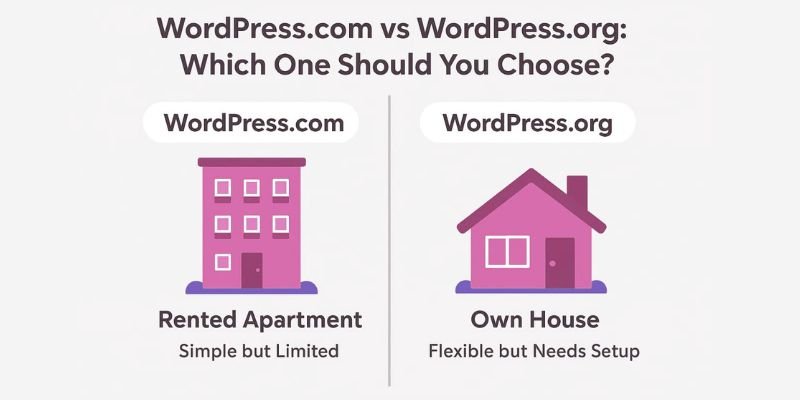
- Choose WordPress.com if you’re a beginner, hobbyist, or want zero maintenance.
- Choose WordPress.org if you want full control, growth, and long-term freedom.
Conclusion
Friends, we’ve covered WordPress.com vs WordPress.org in this article. From my experience, if you want true ownership, flexibility, and the ability to grow without limits, WordPress.org is the smarter choice. WordPress.com works fine for beginners who want simplicity, but for long-term success and SEO control, I personally recommend WordPress.org.
Take the first step today, choose the platform that suits your vision, and remember your website isn’t just a site, it’s your digital future. Build it with confidence!
FAQs
WordPress.com is a hosted service where your website is managed for you, while WordPress.org is self-hosted, giving you full control. With .com, hosting, security, and maintenance are handled. With .org, you handle hosting and have unlimited customization freedom.
For absolute beginners who want a simple setup, WordPress.com is easier. But if you’re willing to learn and want long-term flexibility, WordPress.org is better. Many users start with .com and later move to .org.
No, WordPress.com provides free hosting. You only pay extra for advanced features like custom domains, themes, and plugins. With WordPress.org, however, you must buy hosting separately.
On the free WordPress.com plan, plugins are not allowed. You need to upgrade to higher-tier paid plans to install them. WordPress.org allows you to install any free or paid plugin without restrictions.
At first glance, WordPress.com looks cheaper because it includes hosting. But costs add up when you need extra features. WordPress.org can be more cost-effective in the long run because you control hosting and features.
With WordPress.com, your site is hosted on their servers, so they technically have more control. With WordPress.org, you fully own your website, content, and files. That’s why many professionals prefer WordPress.org.
Yes, you can migrate from WordPress.com to WordPress.org anytime. It requires exporting your content and setting up hosting. Many users start on WordPress.com and later move to .org for more control.
WordPress.org is much better for SEO because you can use any plugin and customize your site for optimization. WordPress.com has limited SEO tools unless you buy advanced plans. For full SEO freedom, go with WordPress.org.
Yes, WordPress.com has a free plan, but it comes with limitations. You’ll see WordPress ads and can’t use custom plugins or themes. To unlock more features, you need a paid plan.
If you want a professional website that can grow with your business, WordPress.org is the better option. It gives you full ownership, flexibility, and scalability. WordPress.com is fine for hobby blogs or personal sites.



- Be Respectful
- Stay Relevant
- Stay Positive
- True Feedback
- Encourage Discussion
- Avoid Spamming
- No Fake News
- Don't Copy-Paste
- No Personal Attacks
- Be Respectful
- Stay Relevant
- Stay Positive
- True Feedback
- Encourage Discussion
- Avoid Spamming
- No Fake News
- Don't Copy-Paste
- No Personal Attacks
